Activepieces Image Generation: On-Brand Cards for Posts

Activepieces image generation works best when the image comes from a template, not a prompt. You want the same branded card every day, with only the words changing, and that's a job for a render API. Add one Send HTTP request step that calls imejis, and every run of your flow produces a finished, on-brand image URL that the next step can post.
The job we built this for: a solo founder posts a quote card to LinkedIn every weekday at 8:00. She self-hosts Activepieces because it's open source and runs in one container. The card design never changes. Before, she remade it by hand in a design app every morning; now a three-step flow does it.
What you'll build
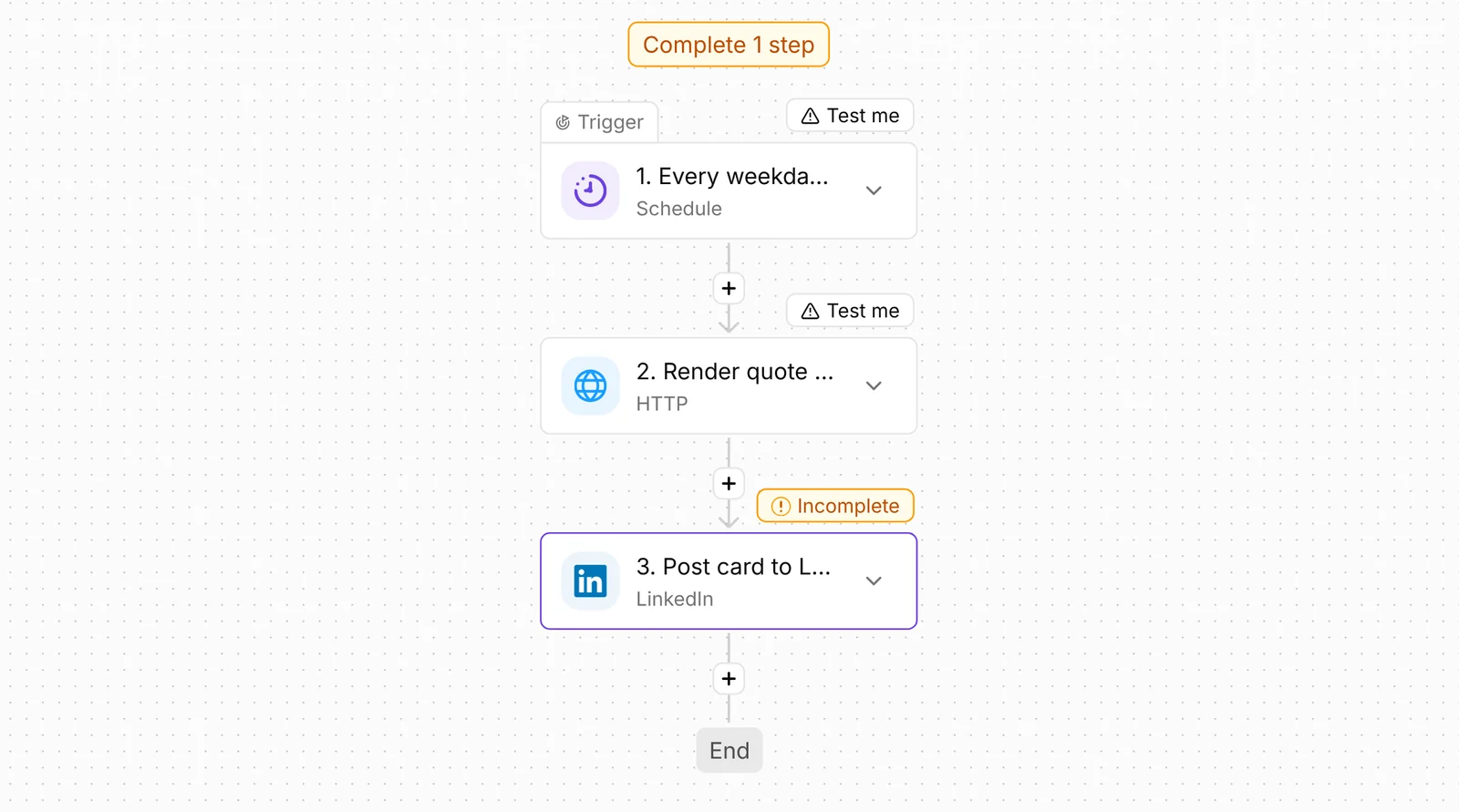
Three steps. imejis is the middle one.
- Schedule trigger: Every Day at 8:00, weekdays only.
- Send HTTP request: calls the imejis render API with the day's quote and gets back a hosted image URL.
- LinkedIn, Create Share Update: posts the text with that URL as the image.
Here's the flow on a real Activepieces canvas. We built it on a self-hosted instance while writing this post:
And this is the card the HTTP step renders, from a real imejis design with three text fields overridden:
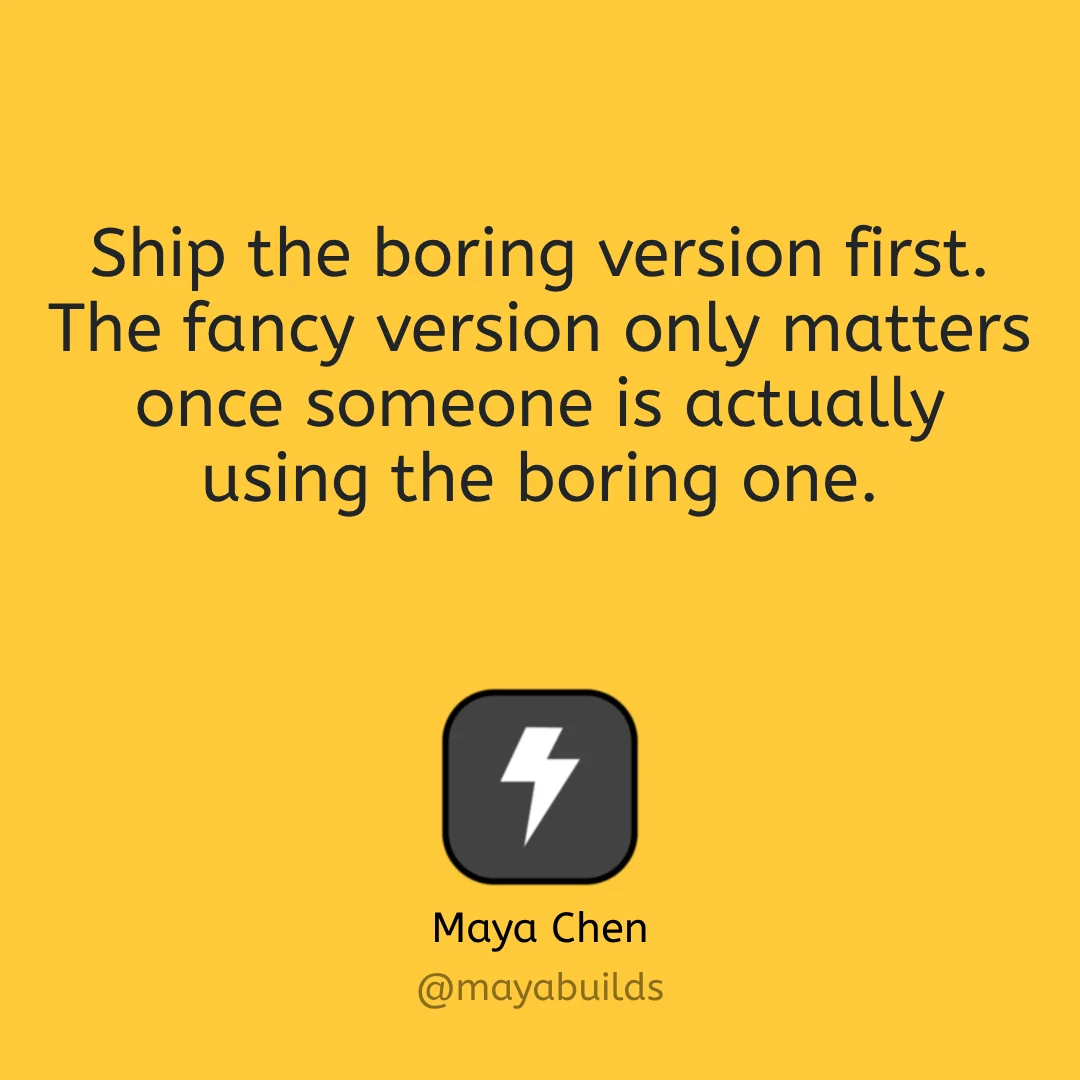
Tomorrow's run is the same call with a different quote. That's what a template buys you over an AI image: the layout, fonts and colors don't drift.
Prerequisites
-
Activepieces, cloud or self-hosted. For a quick local install, one container with the embedded database is enough:
docker run -d --name activepieces -p 8080:80 \
  -v ~/.activepieces:/root/.activepieces \
  -e AP_DB_TYPE=PGLITE \
  -e AP_REDIS_TYPE=MEMORY \
  -e AP_FRONTEND_URL="http://localhost:8080" \
  activepieces/activepieces:latest
Open
http://localhost:8080and sign up. The first account becomes the admin. -
An imejis account and a render API key. It goes in the
dma-api-keyheader. -
One imejis design with the changing text marked dynamic. The quote image maker is a quick place to start.
-
A LinkedIn connection in Activepieces, or swap step 3 for whichever network or scheduler you post with.
Step 1: Add the schedule trigger
Create a flow, choose the Schedule piece, and pick Every Day. Set the hour to 8, pick your timezone, and leave Run on weekends off. That's the whole trigger. If you'd rather post on a custom rhythm, the same piece has Every Week and Cron Expression.
Step 2: Render the card with an HTTP request step
Add the HTTP piece and choose Send HTTP request. Fill it in like this:
- Method:
POST - URL:
https://render.imejis.io/v1/YOUR_DESIGN_ID - Headers:
dma-api-keyset to your imejis key - Query params:
deliveryset tohosted - Authentication: None (the header carries the key)
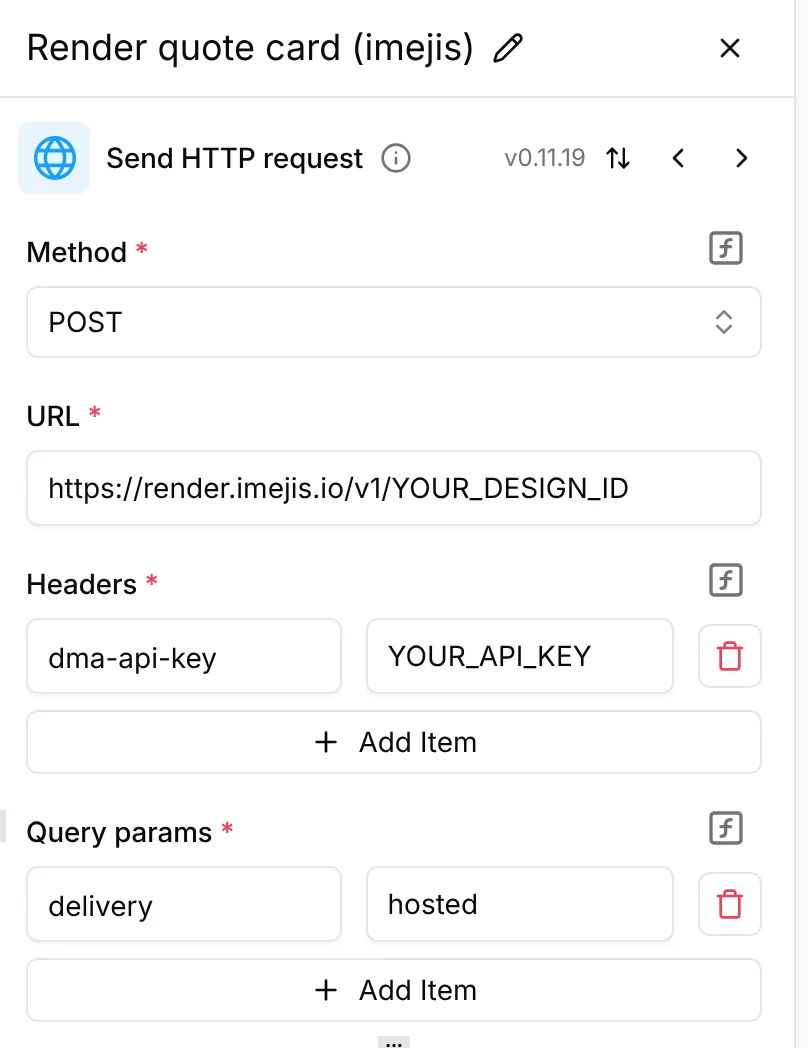
Then set Body Type to JSON and map your text onto the design's dynamic fields. In our design those are content.text, name.text and username.text:
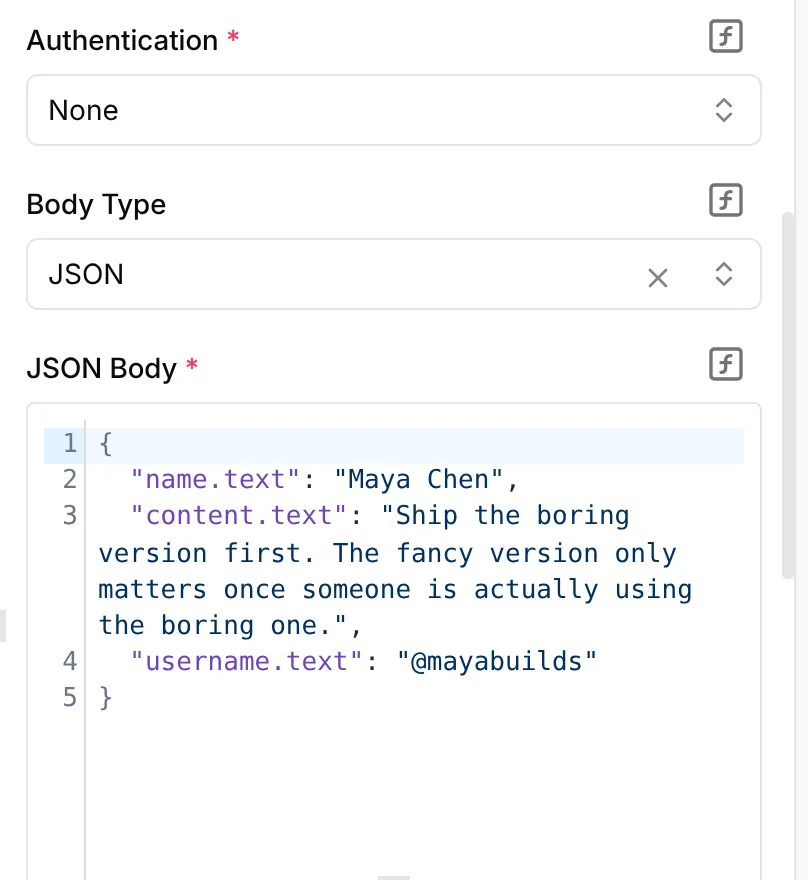
In a real flow, replace the fixed quote with data from an earlier step, such as a Google Sheets row, using Activepieces' data selector.
Two details we've found matter. The render endpoint authenticates with dma-api-key only, so leave Authentication on None rather than picking Bearer Token. And delivery=hosted belongs in Query params, not the JSON body, where it would be ignored and you'd get raw image bytes instead of a URL.
Click Test Step. Ours came back with status 200 and this body:
{
  "success": true,
  "delivery": "hosted",
  "url": "https://storage.googleapis.com/imejis/hosted-exports/....jpg",
  "format": "jpeg",
  "file": { "bucket": "imejis", "path": "hosted-exports/....jpg", "size": 74398 }
}
url is the finished image. It's permanent, so it'll still be there when the next step, or a scheduler hours later, fetches it. Add "format": "png" to the query params if you'd rather have a PNG than a JPEG.
Step 3: Post the card to LinkedIn
Add the LinkedIn piece and choose Create Share Update. Write the post text, pick a visibility, and in the Image field insert the HTTP step's output: body → url. Activepieces shows it as a chip, 2. body url:
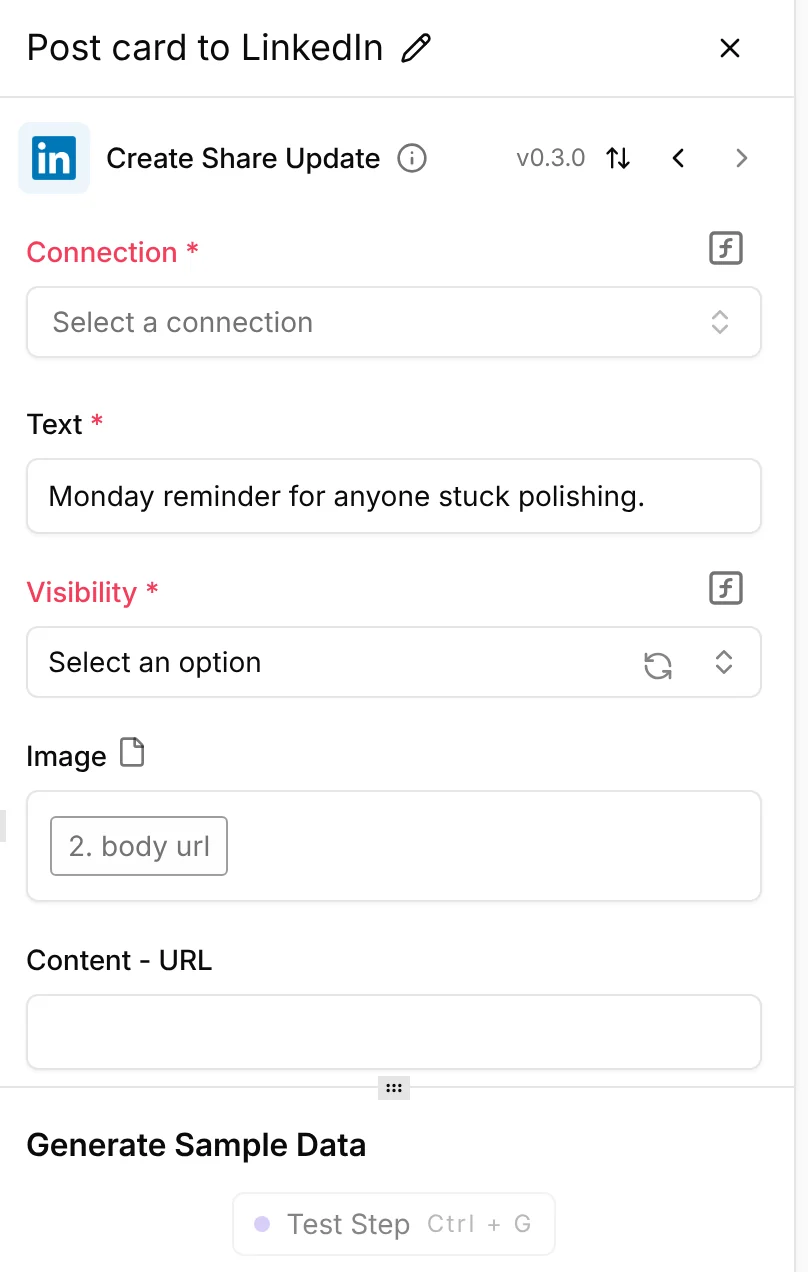
Activepieces file fields accept a URL, so there's no download or upload step in between. Connect your LinkedIn account, test the step, and publish the flow. (Our screenshots show the step as Incomplete because we didn't connect a LinkedIn account on the test instance.)
The same pattern works for other destinations. Map body.url into Facebook Pages' Create Page Photo, Instagram's Upload Photo, or an HTTP call to a scheduler like Postiz or Mixpost, which can import images by URL.
Why a template beats an AI image here
| Need | AI image from a prompt | imejis template render |
|---|---|---|
| Same layout every day | Varies run to run | Fixed by the design |
| Exact text on the image | Often garbled | Rendered as typed |
| Brand fonts and colors | Approximate | Exact |
| Cost per image | Model credits | One render |
Use AI for one-off illustrations. For a series, like a daily quote, a weekly tip or a product card, a template keeps every post recognisably yours.
Or automate it with MCP
Activepieces ships a built-in MCP server, so an AI assistant like Claude can build and test flows like this one for you. imejis has an MCP server too: connect it, and the agent creates the design, marks fields dynamic and renders cards on request, returning the hosted URL. Activepieces also has an MCP Client piece for calling external MCP servers from inside a flow.
Either way, the split stays the same: imejis renders the image, and Activepieces plus the social network do the posting. Start from the agent connect hub, and see generating images with Claude over MCP for a walkthrough.
Common issues and fixes
- 401 from imejis. You picked Bearer Token in Authentication. Set it to None and send the key as the
dma-api-keyheader. - The step returns binary garbage.
deliveryisn't in Query params, so imejis returned the image bytes. Move it there. - The text didn't change. The field isn't marked dynamic in the design, or the key is wrong. Use the exact keys from the design's render config.
- LinkedIn rejects the image. Check the URL in the HTTP step's output opens in a browser. A hosted URL always should.
- Self-hosted webhooks don't fire.
AP_FRONTEND_URLmust be a URL third parties can reach. For a schedule trigger it doesn't matter.
What it costs
Each card is one render on your imejis plan. A weekday schedule is about 22 renders a month, well inside the free tier's 100 renders. The Activepieces core is MIT-licensed and free to self-host, so you can run the whole flow at no cost while you test it. See pricing for larger plans.
Next steps
Build the flow once with a fixed quote, test each step, then swap the quote for a Google Sheets row and publish. The image generation API docs explain the field model and delivery modes, and the Activepieces docs cover pieces and self-hosting. For the same pattern in n8n, see generating images in n8n from a template.