Postiz: Add Branded Images to Every Post Automatically

Here's how to make Postiz add images automatically, with the same branded layout on every post. Postiz is great at scheduling, and it'll even generate an AI image from a prompt. What it won't do is keep one design and change only the words. That's a template job, and it's the gap this tutorial fills: render each image from an imejis template, hand it to Postiz by URL, and schedule the post. Once it's wired up, you never open a design tool.
Here's the job we built this for. A solo founder posts one quote card to LinkedIn every weekday morning through a self-hosted Postiz. The quotes live in a spreadsheet. The card design never changes. Before this pipeline, she spent ten minutes a day in a design app swapping text. Now a workflow does it at 8am.
What you'll build
A five-step pipeline. Only one step is imejis; Postiz owns the scheduling and publishing.
- Trigger: an n8n Schedule Trigger fires every weekday at 8:00.
- Read: n8n pulls the next quote from your sheet.
- Render: an HTTP Request to
render.imejis.ioturns the quote into a branded PNG and returns a hosted URL. - Upload: Postiz fetches that URL through its
upload-from-urlendpoint and returns a mediaidandpath. - Schedule: a create-post call attaches the media and schedules the post for the channel.
This is the card the render step produces. We rendered it from a real imejis design while writing this post, with only three text fields overridden:
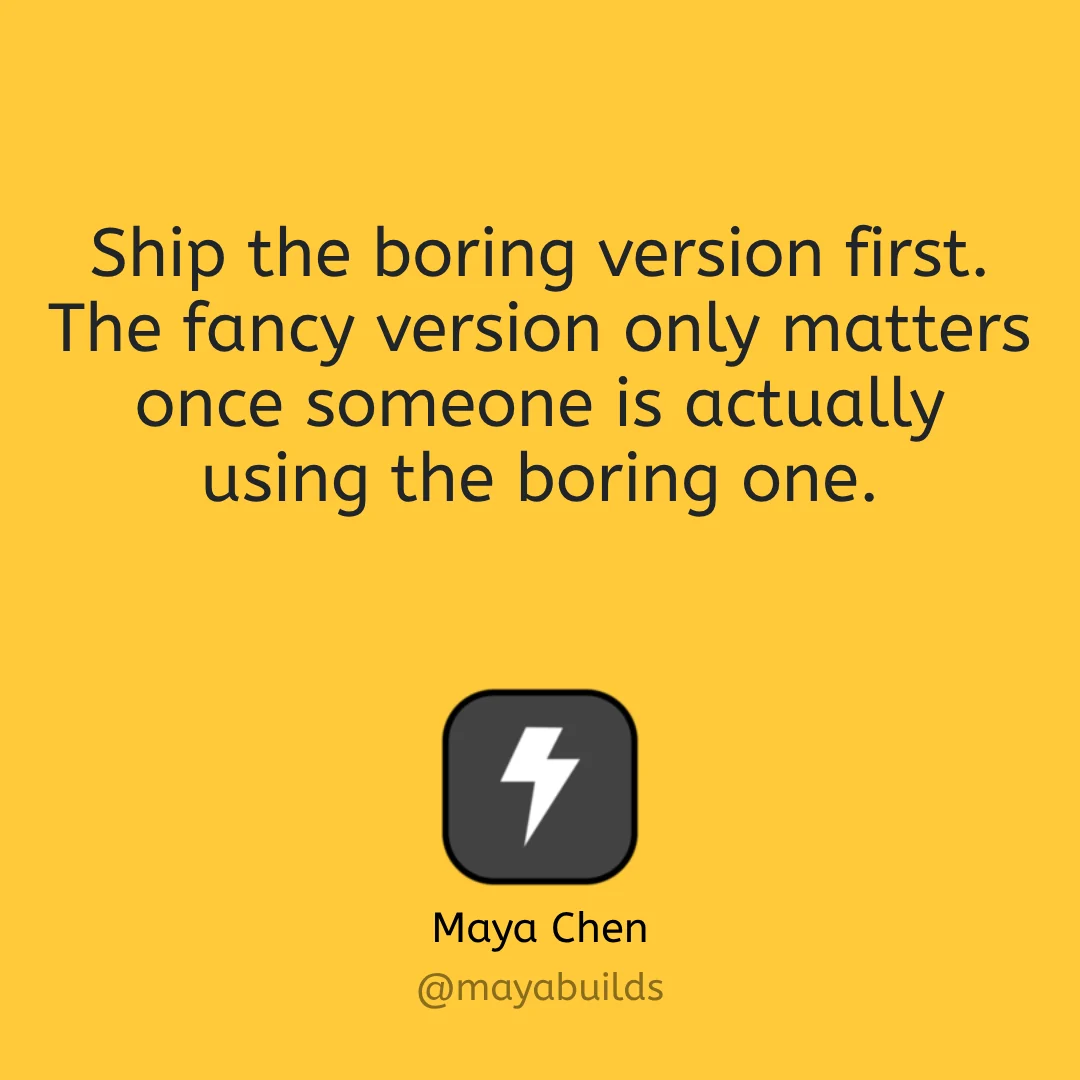
Swap the quote and the name, and the next render is the same card with new words. That consistency is the whole point of a template, and it's what a prompt-based AI image can't promise.
Prerequisites
- Postiz, cloud or self-hosted, with at least one connected channel. You'll need a Postiz API key from its settings.
- An imejis account and a render API key, sent as the
dma-api-keyheader. - One imejis design with the fields that change marked dynamic. Start from the quote image maker or any quote template.
- n8n (or any tool that makes HTTP calls). The steps below show raw HTTP so they translate to Make, Pipedream, or a cron script.
Find your Postiz base URL first, because it differs by install:
| Install | Public API base URL |
|---|---|
| Postiz cloud | https://api.postiz.com/public/v1 |
| Self-hosted (official compose) | https://your-postiz-domain/api/public/v1 |
| Self-hosted, local test | http://localhost:4007/api/public/v1 |
Step 1: Render the image with imejis
Call your design's render endpoint with the new text. Put delivery=hosted on the query string so the response is a permanent URL instead of raw bytes:
curl -X POST "https://render.imejis.io/v1/YOUR_DESIGN_ID?delivery=hosted" \
  -H "dma-api-key: YOUR_IMEJIS_KEY" \
  -H "Content-Type: application/json" \
  -d '{
    "content.text": "Ship the boring version first. The fancy version only matters once someone is actually using the boring one.",
    "name.text": "Maya Chen",
    "username.text": "@mayabuilds"
  }'
The response carries the image URL:
{
  "success": true,
  "delivery": "hosted",
  "url": "https://storage.googleapis.com/imejis/hosted-exports/....jpg",
  "format": "jpeg",
  "file": { "bucket": "imejis", "path": "hosted-exports/....jpg", "size": 74398 }
}
Add format=png to the query string if you want a PNG instead of the default JPEG.
The keys content.text, name.text, and username.text belong to the design we used. Yours will match your design's dynamic components, which you'll find in its render config. Two rules we've found matter every time: authenticate with dma-api-key (a bearer token won't work on the render endpoint), and keep delivery out of the JSON body, where it's silently ignored.
Step 2: Upload the image to Postiz by URL
Postiz won't take an image URL directly in a post. Every attachment has to be uploaded first, which gives it an id and a path inside Postiz. The quickest route is upload-from-url, which lets Postiz fetch the hosted URL itself:
curl -X POST "https://api.postiz.com/public/v1/upload-from-url" \
  -H "Authorization: YOUR_POSTIZ_API_KEY" \
  -H "Content-Type: application/json" \
  -d '{ "url": "https://storage.googleapis.com/imejis/hosted-exports/....jpg" }'
Note the header. The Postiz public API takes the raw key in Authorization, with no Bearer prefix. Adding one is the most common reason this call fails.
The response is a media record. Keep the id and path for the next step:
{ "id": "MEDIA_ID", "path": "https://.../uploads/....png", "status": "ready" }If you'd rather not expose a public URL, upload the bytes instead. Render without delivery (the response is the PNG), then send it to POST /upload as multipart form data with the field name file. Both routes end with the same id and path.
| Route | What you send | Pick it when |
|---|---|---|
upload-from-url | JSON with the imejis hosted URL | You want the fewest steps (one call, no file juggling) |
upload | Multipart file with the PNG | The image must never sit at a public URL |
One self-hosting detail: upload-from-url blocks private and loopback addresses by default, so the image URL must be publicly reachable over HTTPS. An imejis hosted URL is.
Step 3: Find the channel's integration id
Postiz calls each connected social account an integration. List them once and copy the id of the channel you're posting to:
curl "https://api.postiz.com/public/v1/integrations" \
  -H "Authorization: YOUR_POSTIZ_API_KEY"
Each entry has an id, a name, and an identifier such as linkedin or x. The id doesn't change, so hard-code it in the workflow.
Step 4: Create the scheduled post
Now create the post, attach the uploaded media, and set when it goes out. date is ISO 8601 in UTC, and type is schedule, draft, or now:
curl -X POST "https://api.postiz.com/public/v1/posts" \
  -H "Authorization: YOUR_POSTIZ_API_KEY" \
  -H "Content-Type: application/json" \
  -d '{
    "type": "schedule",
    "date": "2026-12-01T08:00:00.000Z",
    "shortLink": false,
    "tags": [],
    "posts": [
      {
        "integration": { "id": "YOUR_INTEGRATION_ID" },
        "value": [
          {
            "content": "Monday reminder for anyone stuck polishing.",
            "image": [{ "id": "MEDIA_ID", "path": "MEDIA_PATH" }]
          }
        ],
        "settings": { "__type": "linkedin" }
      }
    ]
  }'
Postiz answers with the new post's id per channel. The post now sits on the Postiz calendar with the card attached, and Postiz publishes it at 8:00 UTC. To post the same card to several channels, add one entry per integration to posts; the uploaded media can be reused.
Some channels need more in settings. LinkedIn, Bluesky, Mastodon, and Threads take just __type. Instagram needs a post_type, and YouTube and TikTok need several more fields, so check the Postiz docs for the channel you're using.
Step 5: Wire it into n8n
In n8n, the pipeline is five nodes in a row:
- Schedule Trigger: weekdays at 8:00.
- Google Sheets: read the next unposted row (quote, author, handle).
- HTTP Request (imejis): the Step 1 call, mapping the row onto the design's fields, for example
"content.text": "{{ $json.quote }}". - HTTP Request (Postiz upload): the Step 2 call, with
{{ $json.url }}from the render node as the URL. - HTTP Request (Postiz post): the Step 4 call, with
{{ $json.id }}and{{ $json.path }}from the upload node.
Set the Postiz key as a Header Auth credential named Authorization so it isn't pasted into every node. Postiz also lists a community n8n node, but plain HTTP Request nodes keep every field visible, which makes the first run easier to debug. For a walkthrough of the imejis node itself, with screenshots, see generating images in n8n from a template.
Or automate it with MCP
You don't need a workflow at all if an AI agent can do the calls. imejis ships an MCP server: in Claude, Cursor, or any MCP client, the agent renders the card from your design and returns the hosted URL. Postiz ships its own MCP server too, with tools to upload media from a URL and schedule a post.
Connect both and you can ask for the whole job in one sentence: "render tomorrow's quote card and schedule it on LinkedIn for 8am." The agent does the imejis side through the imejis MCP, then hands the URL to Postiz, which uploads, schedules, and publishes. imejis never posts anything itself. Set up the imejis side from the agent connect hub, and see generating images with Claude over MCP for a walkthrough.
Common issues and fixes
- 401 from Postiz. You sent
Bearer YOUR_KEY. The public API wants the raw key inAuthorization. (The Postiz MCP endpoint is the one place that does takeBearer.) - 401 from imejis. The render endpoint reads only
dma-api-key. A bearer token is ignored. upload-from-urlfails on your own server. The URL points at a private or local address, which Postiz blocks by default. Use the imejis hosted URL, or upload the bytes to/upload.- The post has no image. You put the image URL straight into
value[].image. Upload it first and pass theidandpathPostiz returns. - 429 Too Many Requests. Postiz caps post creation per hour (
API_LIMIT, which the official self-host compose sets to 30). One post a day is nowhere near it, but a backfill loop can be. - The image went stale. You uploaded a signed URL that expired before Postiz fetched it. Use
delivery=hosted.
What it costs
Each card is one render on your imejis plan. A weekday posting schedule is about 22 renders a month, well inside the free tier's 100 renders. Postiz is free to self-host, and n8n is too, so the whole pipeline can run at zero cost while you test it. See pricing for the paid plans if you scale up.
Next steps
Start with one channel and one card, run it once by hand, then turn on the schedule. When it works, add a second design for a different post type, or a second channel in the same create-post call. The image generation API docs cover the field model, and the Postiz public API docs list every channel's settings. For more n8n recipes on the same render call, see the copy-paste workflows guide.