Generate Certificates from a CSV: 1 PDF per Row

To generate certificates from a CSV, you design the certificate once, mark the name, course and date as fields, and send every row to a render API that returns one PDF each. That part takes an afternoon. The parts that bite later are the ones this guide is built around: a name too long for the line, a rerun that issues everyone a second certificate, and no way for an employer to check that a certificate is real.
Here's the job. A training company finishes a cohort of its Advanced Workflow Automation course, exports the attendee list as attendees.csv, and needs a PDF certificate per person by the end of the day. Each certificate gets a unique ID and a QR code that opens a verify page. Next month the list grows, and only the new people should get certificates.
What you need
- A certificate design with dynamic fields. Ours has
recipient,course,issued,cert_idand a QR code layer,verify_qr. You can start from the certificate maker or the template gallery. - An imejis API key, sent in the
dma-api-keyheader. - Python 3 with
requests. We ran everything onpython:3.12-slim.
The CSV is whatever your course platform exports. Ours has four columns:
name,email,course,completed_on
Ananya Krishnan,ananya@example.com,Advanced Workflow Automation,2026-11-20
Tomás Ferreira,tomas@example.com,Advanced Workflow Automation,2026-11-20
Maximiliana Oyelaran-Featherstonehaugh,max@example.com,Advanced Workflow Automation,2026-11-21
Zoë Nakamura-Lindqvist,zoe@example.com,Advanced Workflow Automation,2026-11-21
Kwame Asante,kwame@example.com,Advanced Workflow Automation,2026-11-22
Li Wei,liwei@example.com,Advanced Workflow Automation,2026-11-22
How do you generate certificates from a CSV?
You turn each row into the design's fields, send the rows in batches to the bulk endpoint with format: "pdf", and keep a record of what you issued. The whole script is three steps:
# issue_certificates.py: one PDF certificate per CSV row, 25 renders per request.
import csv
import hashlib
import os
from datetime import date

import requests

API_KEY = os.environ["IMEJIS_API_KEY"]
DESIGN_ID = os.environ["IMEJIS_DESIGN_ID"]
VERIFY_URL = "https://academy.example.com/verify/"  # your own lookup page
LEDGER = "issued.csv"  # what's been issued, and where each PDF lives


def cert_id(row):
    # Stable: the same person and course always get the same ID, on every run.
    digest = hashlib.sha1(f"{row['email'].lower()}|{row['course']}".encode()).hexdigest()
    return f"AW-{row['completed_on'][:4]}-{digest[:6].upper()}"


def fields(row, cid):
    return {
        "recipient.text": row["name"],
        "course.text": f"has completed the {row['course']} course",
        "issued.text": date.fromisoformat(row["completed_on"]).strftime("%-d %B %Y"),
        "cert_id.text": f"Certificate ID {cid}",
        "verify_qr.value": VERIFY_URL + cid,
    }


# 1. Read the attendees, and skip anyone who already has a certificate.
with open("attendees.csv", newline="", encoding="utf-8") as f:
    rows = list(csv.DictReader(f))
issued = {}
if os.path.exists(LEDGER):
    with open(LEDGER, newline="", encoding="utf-8") as f:
        issued = {r["cert_id"]: r for r in csv.DictReader(f)}
todo = [(r, cert_id(r)) for r in rows if cert_id(r) not in issued]
print(f"{len(rows)} attendees, {len(todo)} to issue")

# 2. Render in chunks of 25: one request, one PDF per row.
new = []
for i in range(0, len(todo), 25):
    chunk = todo[i : i + 25]
    res = requests.post(
        "https://render.imejis.io/bulk",
        headers={"dma-api-key": API_KEY},
        json={
            "designId": DESIGN_ID,
            "delivery": "hosted",
            "format": "pdf",
            "data": [fields(r, cid) for r, cid in chunk],
        },
        timeout=120,
    )
    if res.status_code == 429:
        raise SystemExit(f"Render quota reached, resets {res.json()['data']['resetAt']}")
    res.raise_for_status()
    body = res.json()
    print(f"  rows {i + 1}-{i + len(chunk)}: {body['summary']}")
    # results[i] belongs to chunk[i]; a failed row doesn't sink the others.
    for (row, cid), result in zip(chunk, body["results"]):
        if result.get("success"):
            new.append({"cert_id": cid, "name": row["name"], "email": row["email"], "pdf_url": result["url"]})
        else:
            print(f"  {row['email']} failed: {result.get('error')}")

# 3. Append to the ledger: your mail merge and your verify page both read it.
write_header = not os.path.exists(LEDGER)
with open(LEDGER, "a", newline="", encoding="utf-8") as f:
    w = csv.DictWriter(f, fieldnames=["cert_id", "name", "email", "pdf_url"])
    if write_header:
        w.writeheader()
    w.writerows(new)
print(f"{len(new)} issued, ledger has {len(issued) + len(new)} certificates")
Run it with your key and design id:
IMEJIS_API_KEY=YOUR_API_KEY IMEJIS_DESIGN_ID=YOUR_DESIGN_ID python issue_certificates.pyThis is the real output from our six-person CSV:
6 attendees, 6 to issue
  rows 1-6: {'total': 6, 'succeeded': 6, 'failed': 0}
6 issued, ledger has 6 certificates
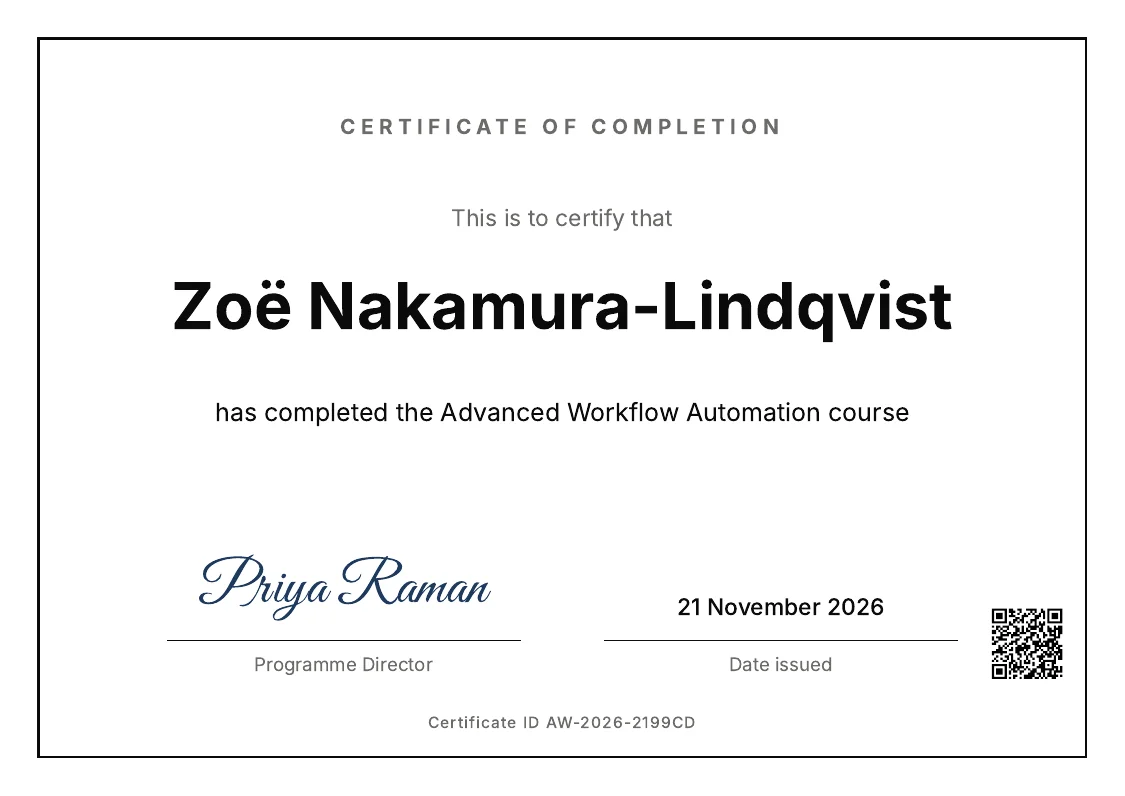
And this is one of the six PDFs, Zoë's, rendered from her row:
Step 1: give every certificate a stable ID
An ID has to survive reruns. If you number certificates 1, 2, 3 by row, adding a person at the top of the CSV renumbers everyone below them. So cert_id hashes the email and course instead: the same person on the same course gets the same ID on every run, in any row order.
The ID goes on the certificate twice. Once as text, Certificate ID AW-2026-2199CD, and once inside the QR code as https://academy.example.com/verify/AW-2026-2199CD. We decoded the QR code from the finished PDF with zbarimg to check, and it read back exactly that URL.
Step 2: render 25 certificates per request
The bulk endpoint takes up to 25 rows in data and renders each one with the same design. With format: "pdf" and delivery: "hosted", every row comes back as a permanent link to a single-page PDF. results keeps the order you sent, so results[i] is chunk[i], and one failed row doesn't sink the other 24.
What we got back, checked with pdfinfo and pdftotext:
- One page per certificate, about 140 KB each.
- Real text, not a picture of text.
pdftotextpulled out "Zoë Nakamura-Lindqvist has completed the Advanced Workflow Automation course", accent included, so the PDFs are searchable and screen readers can read them. - A page size that follows the design. Our 1080 by 764 design came out at 810 by 573 points, because the PDF maps 1 pixel to 0.75 points.
That last point matters if anyone prints them. 810 by 573 isn't a paper size, so a printer scales it. Size the design to the paper instead:
| Paper | Design size in pixels | PDF page in points |
|---|---|---|
| A4 landscape | 1123 × 794 | 842 × 595 |
| US Letter landscape | 1056 × 816 | 792 × 612 |
A 429 stops the script on purpose. On this API it means your render quota is used up, with a resetAt time in the body, so there's nothing to retry until then.
Step 3: keep a ledger of what you issued
issued.csv is the script's memory. Every certificate it issues adds a row with the ID, name, email and PDF link, and every run skips anyone already in it. We ran the script a second time with nothing changed:
6 attendees, 0 to issue
0 issued, ledger has 6 certificates
Then we added one late finisher to the CSV:
7 attendees, 1 to issue
  rows 1-1: {'total': 1, 'succeeded': 1, 'failed': 0}
1 issued, ledger has 7 certificates
The ledger does two more jobs:
- It's your mail merge list. Each row has a name, an email and a PDF link, which is what a Gmail or Mailchimp send needs. Put it in Google Sheets and a mail merge add-on can take it from there.
- It's what your verify page reads. When someone scans the QR code, your page looks the ID up in the ledger and shows the name, course and date. imejis renders the QR code; the lookup is yours.
Python's csv module writes Windows line endings (\r\n). If a shell script reads the ledger later, strip the \r, or every URL ends in an invisible character and the download fails. We hit exactly that.
How do you stop long names from breaking the layout?
Turn on auto-resize for the name layer. Our first render of the longest name in the list looked like the left side of this image:
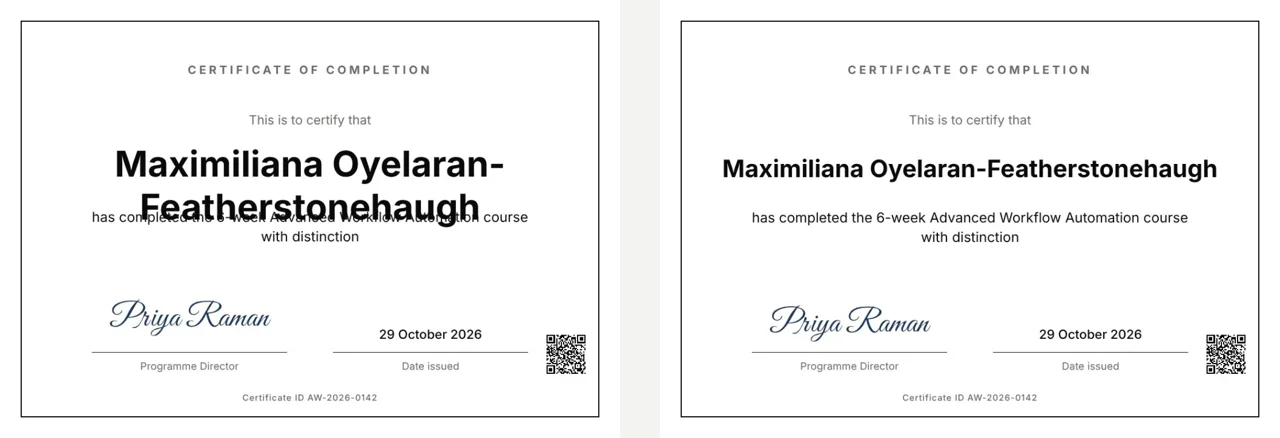
The layer had a minimum and maximum font size, but those do nothing until autoResize is on, so the name wrapped into the line below. With it on, the name shrinks to fit its box on one line, down to the minimum size. Do this for every field that holds people's input (name, course title, signatory), then preview the longest value in your CSV before rendering the batch.
Two more things to check against your real list:
- Accents and other scripts. Zoë and Tomás rendered correctly in Inter. If your list includes names in scripts your font doesn't cover, pick a font that does before you render.
- Empty cells. A blank value falls back to the text saved in the design, so an empty name prints the sample name. Filter out incomplete rows first.
Are hosted certificate links private?
No. A hosted link is public: anyone who has it can open the PDF. That's usually fine for a certificate the recipient will share on LinkedIn anyway. If the certificate holds anything sensitive, download each PDF into your own storage and send links you control, or ask for delivery: "signed", which expires after up to 7 days. Image API delivery modes compares the three options.
Common issues and fixes
- The name overlaps the line below. Auto-resize is off on that layer. Turn it on and set a minimum font size.
- The printed certificate has white margins or is cropped. The design isn't the paper's size. Use 1123 by 794 for A4 or 1056 by 816 for Letter.
- Everyone got a second certificate. The ledger file was deleted or moved. Keep
issued.csvwith the script and back it up. - A certificate shows the sample name. That row's name cell was empty. Empty values fall back to the design's text.
- The QR code opens the wrong page. Check
VERIFY_URL. The QR code holds whatever URL you pass, character for character.
How much does it cost?
As of November 2026, it's one render per certificate, whatever the format. Our seven certificates were seven renders, and the rerun that issued nothing cost nothing. A training company issuing 40 certificates a month uses 40 renders, well inside the free tier's 100 renders. See pricing for larger cohorts.
Next steps
Copy issue_certificates.py, map fields() to your design's layer names, and render three rows, including your longest name, before the whole list. For when to pick PDF over PNG and how signed links work, see the certificate generator API guide. For the same batch pattern with images instead of PDFs, see batch image generation from CSV. Every format and the bulk endpoint have runnable Python on the Python API page, and Python's csv module docs cover the reader and writer the script uses.