Quote Card Generator API: 1 Design, Every Quote

A quote card generator API turns a quote, an author and a theme into a finished image with one request. You design the card once, mark the quote, name and colors as fields, and every card after that is the same layout with different words. That's the easy part. This guide covers the three things that go wrong once real quotes arrive: a quote too long for the card, a second theme that becomes a second design to maintain, and an image link that leaks your API key.
The job we built it for: a newsletter runs a "quote of the week" card on its site, in each issue and on social. Editors add quotes to a file. The card has to fit whatever they paste in, come in a dark and a light version, and work as a plain image link.
What goes on a quote card?
Ours is a 1080 by 1080 card with six dynamic layers. If you don't have a design yet, the quote image maker is a quick start, and the best quote image makers roundup compares no-code options.
| Layer | Field key | Notes |
|---|---|---|
| Quote | quote.text | Auto-resize on, 64 px down to 30 px |
| Author | author.text | Auto-resize on, so long names fit one line |
| Role | role.text | Title and company |
| Avatar | avatar.image | Any public image URL, cropped to a circle |
| Colors | bg.fillColor, quote.color… | Every color layer is dynamic, for themes |
One request renders a card:
curl -X POST "https://render.imejis.io/v1/YOUR_DESIGN_ID?format=png" \
  -H "dma-api-key: YOUR_API_KEY" \
  -H "Content-Type: application/json" \
  -d '{ "quote.text": "Customers don'\''t remember your feature list. They remember the one afternoon your product saved them.", "author.text": "Maya Chen", "role.text": "Founder, Boring Software Co." }' \
  -o quote.png
How long can a quote be?
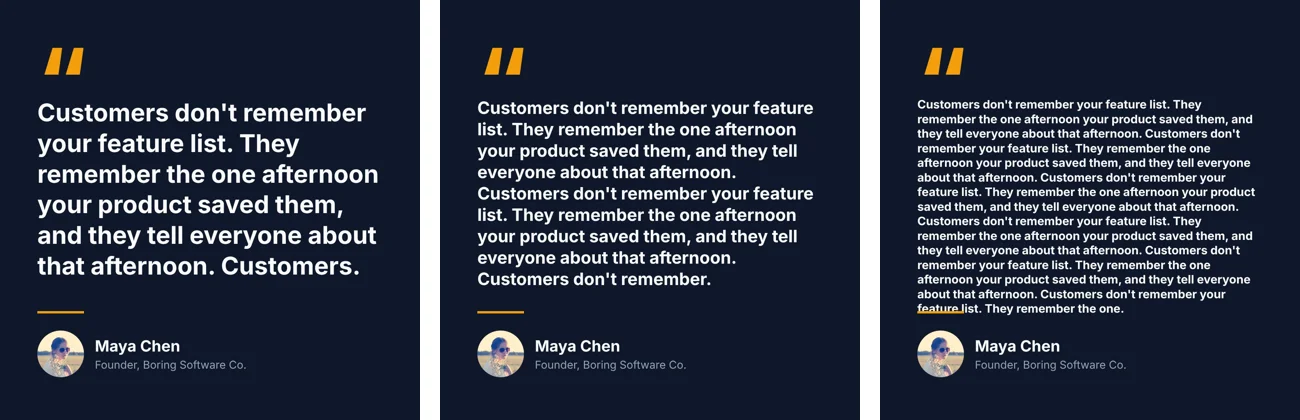
Shorter than the API will accept. We rendered the same card with quotes of 76, 156, 235, 317, 416, 560 and 800 characters. Here are 156, 317 and 800:
What we found:
- Up to 560 characters, auto-resize keeps the quote inside its box. It shrinks the font until the text fits, down to the 30 px minimum.
- Past roughly 280 characters, the card stops working as a card. The text is legible at full size but too small on a phone, which is where most people will see it.
- At 800 characters the text overflows silently. At the minimum size it still didn't fit, so it ran into the accent line below. The response was a normal
200with nox-dma-warningsheader. The API won't stop you, so your code has to.
So set a budget and enforce it where quotes come in. We use 280 characters, about the length of a long post on X. The route below refuses anything longer with a 422.
Can one design make light and dark cards?
Yes. The background is a full-size rectangle with a fillColor, and each text layer has a color. A theme is then just a set of overrides you merge into the request. We marked every color layer dynamic, which lists them in the design's API panel so nobody has to guess the keys. In our tests an override on a non-dynamic layer was applied anyway, so dynamic is about documenting the contract, not unlocking it.
{
  "bg.fillColor": "#faf7f2",
  "quote.color": "#111827",
  "author.color": "#111827",
  "role.color": "#6b7280",
  "mark.color": "#c2410c",
  "rule.fillColor": "#c2410c"
}
Same design, same quote, two requests:
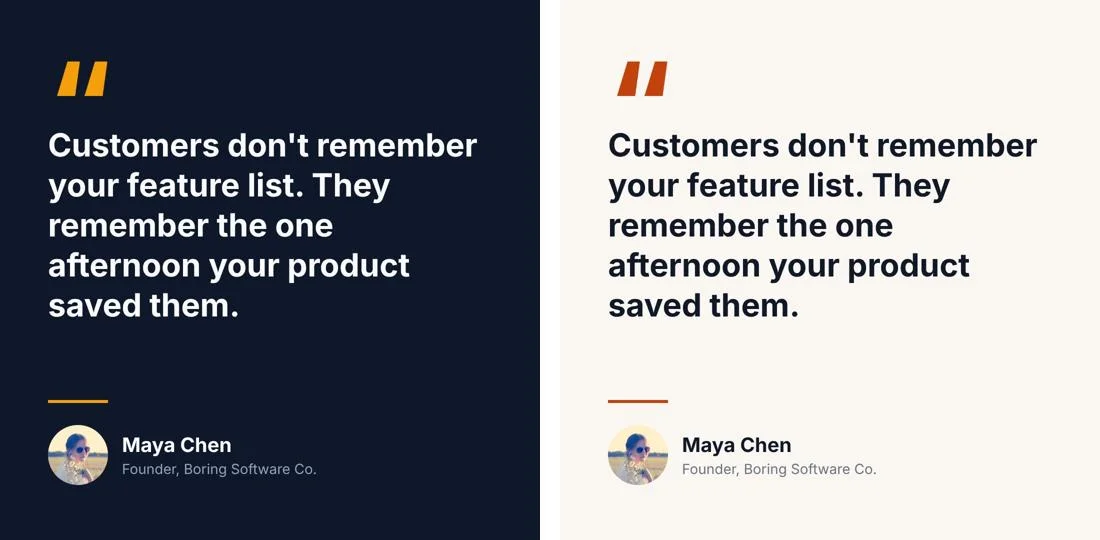
This beats keeping two designs. Move the avatar or change the font once, and both themes follow. A brand theme per client works the same way, which matters if you make cards for several clients.
How do you get a live quote image URL without exposing your key?
Don't put the key in the URL. The render endpoint accepts a GET request with the key and fields in the query string, which looks perfect for an <img src>. But anyone who views the page source can copy that key and render anything on your quota. The OG image guide and image API security practices both warn about this.
Serve the card from your own route instead. Your page uses /q/afternoon.png; your server looks up the quote, adds the key, renders once, and caches the result. Here's the whole thing, Node with no dependencies. The quotes live in quotes.json:
{
  "afternoon": {
    "quote": "Customers don't remember your feature list. They remember the one afternoon your product saved them.",
    "author": "Maya Chen",
    "role": "Founder, Boring Software Co.",
    "avatar": "https://picsum.photos/id/64/200/200"
  },
  "boring": {
    "quote": "Ship the boring version first. The fancy version only matters once someone is using the boring one.",
    "author": "Daniel Okafor",
    "role": "Head of Product, Fieldnote",
    "avatar": "https://picsum.photos/id/91/200/200"
  }
}
And the server, quote-server.mjs:
// quote-server.mjs: /q/<id>.png serves a quote card. The API key never leaves the server.
import { createServer } from "node:http"
import { readFile } from "node:fs/promises"
import { createHash } from "node:crypto"

const API_KEY = process.env.IMEJIS_API_KEY
const DESIGN_ID = process.env.IMEJIS_DESIGN_ID
const MAX_QUOTE = 280 // past this the text gets too small to read on a phone

const THEMES = {
  dark: {},
  light: {
    "bg.fillColor": "#faf7f2",
    "quote.color": "#111827",
    "author.color": "#111827",
    "role.color": "#6b7280",
    "mark.color": "#c2410c",
    "rule.fillColor": "#c2410c",
  },
}

const cache = new Map() // hash of the fields -> PNG bytes

async function renderCard(fields) {
  const res = await fetch(`https://render.imejis.io/v1/${DESIGN_ID}?format=png`, {
    method: "POST",
    headers: { "dma-api-key": API_KEY, "Content-Type": "application/json" },
    body: JSON.stringify(fields),
  })
  if (!res.ok) throw new Error(`render failed: ${res.status} ${await res.text()}`)
  return Buffer.from(await res.arrayBuffer())
}

createServer(async (req, res) => {
  const url = new URL(req.url, "http://localhost")
  const match = url.pathname.match(/^\/q\/([\w-]+)\.png$/)
  const quotes = JSON.parse(await readFile("quotes.json", "utf8"))
  const q = match && quotes[match[1]]
  if (!q) return res.writeHead(404).end("no such quote")
  if (q.quote.length > MAX_QUOTE) return res.writeHead(422).end("quote too long for the card")

  const fields = {
    "quote.text": q.quote,
    "author.text": q.author,
    "role.text": q.role,
    "avatar.image": q.avatar,
    ...(THEMES[url.searchParams.get("theme")] ?? THEMES.dark),
  }
  const etag = `"${createHash("sha1").update(JSON.stringify(fields)).digest("hex")}"`

  // Same quote, same theme: the browser's copy is still right.
  if (req.headers["if-none-match"] === etag) return res.writeHead(304, { ETag: etag }).end()

  let png = cache.get(etag)
  console.log(`${url.pathname}${url.search} ${png ? "cache hit" : "rendering"}`)
  if (!png) {
    try {
      png = await renderCard(fields)
    } catch (err) {
      console.error(err.message)
      return res.writeHead(502).end("render failed")
    }
    cache.set(etag, png)
  }
  res.writeHead(200, {
    "Content-Type": "image/png",
    "Cache-Control": "public, max-age=3600",
    ETag: etag,
  })
  res.end(png)
}).listen(3000, () => console.log("quote cards on http://localhost:3000/q/<id>.png"))
Run it with IMEJIS_API_KEY=YOUR_API_KEY IMEJIS_DESIGN_ID=YOUR_DESIGN_ID node quote-server.mjs, then use the URL anywhere an image goes:
<img src="https://your-site.com/q/afternoon.png?theme=light" alt="Quote of the week by Maya Chen" />We ran it in node:22-slim and requested the same card five ways. This is what came back:
| Request | Status | Time | What happened |
|---|---|---|---|
/q/afternoon.png | 200 | 4.4 s | Rendered, then cached |
/q/afternoon.png again | 200 | 3 ms | Served from the cache, no render |
Same, with If-None-Match | 304 | 1 ms | Browser's copy is still current |
/q/afternoon.png?theme=light | 200 | 3.5 s | New fields, so one new render |
/q/nope.png | 404 | 55 ms | No such quote |
The cache key is a hash of the exact fields sent, so editing a quote in quotes.json changes the hash and the next request renders the new version. Nothing has to be purged. In production, swap the in-memory Map for disk or object storage so a restart doesn't re-render everything.
When should you skip the route and use hosted URLs?
When the quotes are fixed ahead of time. For a newsletter issue or a scheduled social post, render each card once from your backend with delivery=hosted and paste the permanent URL in. No server to run. The route earns its keep when the same quote is shown in many places, in two themes, and edited after publishing. To render a whole file of quotes in one go, the Node.js template tutorial has a worker pool and the bulk endpoint, and image API delivery modes compares hosted and signed links.
Quote cards versus testimonial cards
They share a layout but not a source. A quote card shows something someone said that you choose to share: a founder line, a book passage, a speaker at your event. A testimonial card shows what a customer said about you, and usually comes with a star rating and a pull from a review site. For that version, see automating testimonial images.
Common issues and fixes
- The quote runs into the author block. It's over the box's capacity at minimum size. Enforce a length budget; the API won't warn you.
- Both themes look the same. A color key is misspelled, so it matched no layer. Check the
x-dma-warningsheader, which names any key that matched nothing. - The avatar is blank. The image URL isn't public, or it blocks hotlinking. Use a URL that loads in a private browser window.
- Every page view costs a render. The page points straight at the render endpoint. Put a caching route or a hosted URL in between.
- Smart quotes show as boxes. The font doesn't have the glyph. Inter covers curly quotes and most Latin accents.
How much does it cost?
As of November 2026, it's one render per card. A weekly quote in two themes is 2 renders a week, about 9 a month, however many people see it, because the route serves cached copies. That's well inside the free tier's 100 renders. Without the cache, the same card on a busy page would cost a render per view. See pricing for larger plans.
Next steps
Build the card with dynamic color layers, render your longest real quote first, and set your length budget from what you see. Then put quote-server.mjs in front of it, or render hosted URLs if your quotes never change after publishing. Node's http module docs cover the server API the route uses.