Node.js: Generate Images from a Template (4 Steps)

To generate images from a template in Node.js, you POST the template's field values to a render API with the built-in fetch and write the bytes it returns. That part is five lines. The part that takes a day to get right is everything around it: how many requests to run at once, which errors are worth retrying, and how to avoid paying to re-render a card that didn't change.
Here's the job this guide is built on. A small shop keeps its catalog in products.json, and every product needs a square card for Instagram and ads: photo, name, price, SKU and a badge like "NEW" or "SALE". Prices change most weeks. The script below renders every card once, then on each later run renders only the products whose card would look different.
What you need
- Node 18 or later. That's where
fetchbecame a built-in global. We ran everything onnode:22-slim(Node 22.23). There's nothing tonpm install. - An imejis API key, sent in the
dma-api-keyheader. Keep it in an environment variable. - A design with dynamic fields. Ours is a 1080 by 1080 product card with five:
photo,badge,product_name,priceandsku, plus the badge's pill shape,badge_bg.
The catalog is plain JSON. One of the five products has no badge, which matters later:
[
  { "sku": "FW-021-IVR", "name": "Ivory Leather Pumps", "price": "$129.00", "badge": "NEW", "photo": "https://picsum.photos/id/21/840/520" },
  { "sku": "GM-096-BLK", "name": "Wireless Game Controller", "price": "$59.00", "badge": "", "photo": "https://picsum.photos/id/96/840/520" }
]
How do you generate images from a template in Node.js?
You map each record to the design's field keys, POST them, and save the response. The whole script is four steps in one file, render-cards.mjs:
// render-cards.mjs: one product card per SKU, from a template, with Node's built-in fetch.
import { readFile, writeFile, mkdir } from "node:fs/promises"
import { createHash } from "node:crypto"

const API_KEY = process.env.IMEJIS_API_KEY
const DESIGN_ID = process.env.IMEJIS_DESIGN_ID
const BASE = "https://render.imejis.io"
const CONCURRENCY = 4
const OUT = "cards"

// 1. Map a catalog row to the design's dynamic fields.
const toFields = (p) => ({
  "photo.image": p.photo,
  "product_name.text": p.name,
  "price.text": p.price,
  "sku.text": `SKU ${p.sku}`,
  // An empty string falls back to the design's default text ("NEW"),
  // so a product with no badge hides the pill instead.
  ...(p.badge ? { "badge.text": p.badge } : { "badge.text": " ", "badge_bg.opacity": 0 }),
})

// 2. Render one card. Retry only what a retry can fix.
async function render(fields, attempt = 1) {
  let res
  try {
    res = await fetch(`${BASE}/v1/${DESIGN_ID}?format=jpeg&quality=85`, {
      method: "POST",
      headers: { "dma-api-key": API_KEY, "Content-Type": "application/json" },
      body: JSON.stringify(fields),
    })
  } catch (err) {
    if (attempt < 3) return retry(fields, attempt)
    throw err
  }
  if (res.ok) {
    const warnings = res.headers.get("x-dma-warnings")
    if (warnings) console.warn("  warning:", JSON.parse(decodeURIComponent(warnings)).join(" "))
    return Buffer.from(await res.arrayBuffer())
  }
  const body = await res.json().catch(() => ({}))
  if (res.status === 429) {
    // Quota, not a burst limit: retrying won't help until it resets.
    const err = new Error(`quota reached, resets ${body.data?.resetAt}`)
    err.stop = true
    throw err
  }
  if (res.status >= 500 && attempt < 3) return retry(fields, attempt)
  const err = new Error(`${res.status} ${body.error ?? body.message ?? ""}`.trim())
  err.stop = res.status === 401 || res.status === 404 // wrong key or design: every row will fail
  throw err
}

const retry = async (fields, attempt) => {
  await new Promise((r) => setTimeout(r, 500 * 2 ** attempt))
  return render(fields, attempt + 1)
}

// 3. Skip rows whose fields haven't changed since the last run.
const hash = (fields) => createHash("sha1").update(JSON.stringify(fields)).digest("hex")
const products = JSON.parse(await readFile("products.json", "utf8"))
await mkdir(OUT, { recursive: true })
const seen = JSON.parse(await readFile(`${OUT}/manifest.json`, "utf8").catch(() => "{}"))

const queue = products.filter((p) => seen[p.sku] !== hash(toFields(p)))
console.log(`${products.length} products, ${queue.length} to render`)

// 4. A small worker pool: CONCURRENCY renders in flight, never more.
let stopped = null
async function worker() {
  while (queue.length && !stopped) {
    const p = queue.shift()
    const fields = toFields(p)
    try {
      const img = await render(fields)
      await writeFile(`${OUT}/${p.sku}.jpg`, img)
      seen[p.sku] = hash(fields)
      console.log(`  ${p.sku}.jpg  ${img.length} bytes`)
    } catch (err) {
      console.error(`  ${p.sku} failed: ${err.message}`)
      if (err.stop) stopped = err
    }
  }
}
await Promise.all(Array.from({ length: CONCURRENCY }, worker))
await writeFile(`${OUT}/manifest.json`, JSON.stringify(seen, null, 2))
if (stopped) process.exit(1)
Run it with your key and design id:
IMEJIS_API_KEY=YOUR_API_KEY IMEJIS_DESIGN_ID=YOUR_DESIGN_ID node render-cards.mjsThe first run renders the whole catalog. This is the real output from our five-product file:
5 products, 5 to render
  FW-021-IVR.jpg  125476 bytes
  DK-445-OAK.jpg  89664 bytes
  GM-096-BLK.jpg  61013 bytes
  KT-225-CLR.jpg  84502 bytes
  AC-026-GRY.jpg  90989 bytes
The order is the order requests finished, not file order, because four run at once. Four of those cards:
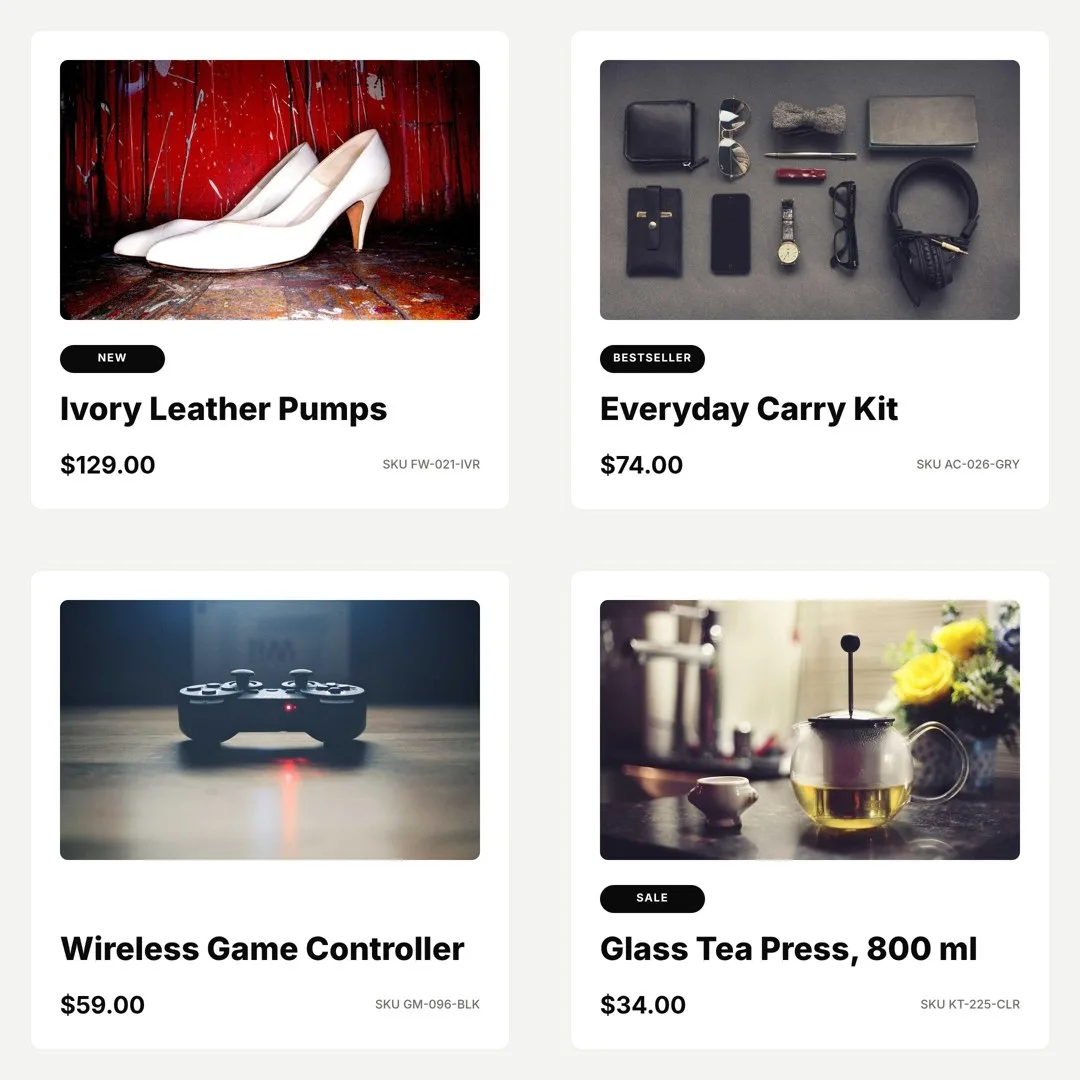
Step 1: map each record to the design's field keys
Every override is layer.property: "price.text" sets the price layer's text, "photo.image" swaps the photo. Keeping that mapping in one toFields function means the render code never needs to know what a product is, and the same function produces the hash in step 3.
Two details in that function come from runs that went wrong:
- An empty string doesn't clear a field. We sent
"badge.text": ""for the controller and got a card that said "NEW", the design's default. Blank values fall back. To show no badge, send a space and set the pill'sopacityto 0, which needs the pill layer marked dynamic in the design. - A typo doesn't fail. We renamed
price.texttoprices.textand still got200and a finished card, with the template's sample price on it. The only signal is anx-dma-warningsheader, which the script prints:Override key "prices" matched no component in the design and was ignored.
To see the exact keys a design accepts, open its API panel or check the Node.js reference.
Step 2: retry only what a retry can fix
Most retry loops treat every non-200 the same. On this API that's wrong in both directions. Here's what each status means, checked against the live endpoint:
| Status | What it means here | What the script does |
|---|---|---|
200 | The body is the image | Save it, print any warning |
404 "Key not found" | The API key is wrong (it's not a 401) | Stop the run |
404 "Design not found" | The design id is wrong | Stop the run |
401 "Unauthorized" | No key was sent at all | Stop the run |
429 | The plan's render quota is used up | Stop and print resetAt |
5xx or a network error | Something transient | Retry twice, 1s then 2s |
The 429 row is the one to get right. There's no per-second throttle behind it: the body carries reason, remaining and a resetAt timestamp for your quota period, so retrying just stalls the run. A bad key is the other trap, because it comes back as a 404, not a 401. We ran the script with a wrong key and it stopped after the requests already in flight:
5 products, 5 to render
  FW-021-IVR failed: 404 Key not found
  GM-096-BLK failed: 404 Key not found
  AC-026-GRY failed: 404 Key not found
  KT-225-CLR failed: 404 Key not found
Four failures, not five, because four workers had a request out when the first error landed. That's the cost of concurrency, and it's a small one.
Step 3: skip rows that haven't changed
Every render counts against your plan, and a repeat request for the same payload is still a render you pay for. So the script hashes each product's fields and keeps the hashes in cards/manifest.json. A product renders only when its hash differs from last time.
We ran it three times in a row. The second run, with nothing changed:
5 products, 0 to renderThen we dropped the tea press from $34.00 to $29.00 and ran it again:
5 products, 1 to render
  KT-225-CLR.jpg  84683 bytes
On a 2,000-product catalog where a few dozen prices move each week, that's the difference between 2,000 renders a week and a few dozen. Hash the fields, not the source row. A change to a column the card doesn't show shouldn't cost a render.
Step 4: cap how many renders run at once
The pool runs CONCURRENCY workers that pull from one shared queue, so there are never more than four requests in flight. It's a dozen lines and needs no library. Four is a sensible start. Raise it for a big catalog, but remember that a higher number also means a wrong key fails more rows before the run stops.
For an Express or Next.js app rather than a script, the render call is the same and the route around it changes. The Express and Next.js pages have runnable routes for both.
Can you get image URLs instead of files?
Yes, from the bulk endpoint. Send up to 25 rows of field values in data, ask for delivery: "hosted", and you get a permanent public URL per row, in the same order you sent them. That suits a catalog feed, an email, or a scheduler that imports images by URL:
// bulk-urls.mjs: hosted image URLs for the whole catalog, 25 renders per request.
import { readFile } from "node:fs/promises"

const API_KEY = process.env.IMEJIS_API_KEY
const DESIGN_ID = process.env.IMEJIS_DESIGN_ID
const products = JSON.parse(await readFile("products.json", "utf8"))

const toFields = (p) => ({
  "photo.image": p.photo,
  "product_name.text": p.name,
  "price.text": p.price,
  "sku.text": `SKU ${p.sku}`,
  ...(p.badge ? { "badge.text": p.badge } : { "badge.text": " ", "badge_bg.opacity": 0 }),
})

const urls = {}
for (let i = 0; i < products.length; i += 25) {
  const chunk = products.slice(i, i + 25)
  const res = await fetch("https://render.imejis.io/bulk", {
    method: "POST",
    headers: { "dma-api-key": API_KEY, "Content-Type": "application/json" },
    body: JSON.stringify({
      designId: DESIGN_ID,
      delivery: "hosted",
      format: "jpeg",
      quality: 85,
      data: chunk.map(toFields),
    }),
  })
  if (!res.ok) throw new Error(`bulk failed: ${res.status} ${await res.text()}`)
  const { results, summary } = await res.json()
  // results[i] belongs to chunk[i]; one failed row doesn't sink the others.
  results.forEach((r, j) => (urls[chunk[j].sku] = r.url ?? `FAILED: ${r.error}`))
  console.log(`rows ${i + 1}-${i + chunk.length}:`, JSON.stringify(summary))
}
console.log(urls)
Our run printed {"total":5,"succeeded":5,"failed":0} and five storage.googleapis.com/imejis/hosted-exports/... links. Bulk saves round trips, not renders: 25 rows is still 25 renders. Signed URLs, multi-size designs and the other bulk shapes are on the Node.js API page, and image API delivery modes explains when a hosted URL beats raw bytes.
Common issues and fixes
- Every card shows the template's sample text. The field keys don't match the design. Read the
x-dma-warningsheader, or compare your keys with the design's API panel. 404 Key not foundon every row. The key is wrong or deactivated. It's a 404, so a check for401alone misses it.- A blank field shows a default like "NEW". Empty strings fall back to the design's text. Hide the layer with
opacity: 0instead. - You got JSON where you expected an image. You asked for
delivery=hostedorsigned, which return a URL. Dropdeliveryto get bytes. fetch is not defined. You're on Node 16 or older. Upgrade to Node 18 or later.
How much does it cost?
As of November 2026, it's one render per card, whatever the format. The five-product catalog above is 5 renders on the first run and 1 when a price changes. A 300-product shop with about 20 changes a week uses around 380 renders in its first month, then about 85 a month after that. The free tier covers 100 renders a month. See pricing for larger plans.
Next steps
Copy render-cards.mjs, point toFields at your own design's keys, and run it on five rows before the whole catalog. For a spreadsheet as the source instead of JSON, see batch image generation from CSV. The same job in Ruby, as a Rake task, is in Ruby: generate images from a template.