Ruby: Generate Images from a Template in 4 Steps

To generate images from a template in Ruby, you POST the template's field values to a render API with Net::HTTP and write the bytes it sends back. No gem, no Gemfile. What turns that into something you can run every week is the code around the request: a thread pool, a retry policy that knows which errors are permanent, and a check that skips rows whose card wouldn't change.
Here's the job we built it for. A shop exports its catalog from the admin as products.csv, and the marketing person needs a square card per product for Instagram and ads. They don't want to open a design tool every time a price moves. So the developer adds one Rake task, rake cards:render, that renders every card the first time and only the changed ones after that.
What you need
- Ruby 3.x. We ran everything on
ruby:3.3-slim(Ruby 3.3.14).csvships as a default gem there; on Ruby 3.4 and later, addgem "csv"to your Gemfile. - An imejis API key in the
IMEJIS_API_KEYenvironment variable. It goes in thedma-api-keyheader. - A design with dynamic fields. Ours is a 1080 by 1080 product card with
photo,badge,product_name,priceandsku, plus the badge's pill shape,badge_bg.
The export is ordinary CSV. Note the quoted name with a comma in it and the empty badge cell on the controller row:
sku,name,price,badge,photo
FW-021-IVR,Ivory Leather Pumps,$129.00,NEW,https://picsum.photos/id/21/840/520
AC-026-GRY,Everyday Carry Kit,$74.00,BESTSELLER,https://picsum.photos/id/26/840/520
GM-096-BLK,Wireless Game Controller,$59.00,,https://picsum.photos/id/96/840/520
KT-225-CLR,"Glass Tea Press, 800 ml",$34.00,SALE,https://picsum.photos/id/225/840/520
DK-445-OAK,Oak Laptop Desk Mat,$48.00,LIMITED,https://picsum.photos/id/445/840/520
How do you generate images from a template in Ruby?
Map each row to the design's field keys, POST them, and save the body. Here's the whole task, in a Rakefile:
# Rakefile: `rake cards:render` makes one product card per CSV row, from a template.
require "csv"
require "json"
require "net/http"
require "digest"
require "fileutils"

API_KEY   = ENV.fetch("IMEJIS_API_KEY")
DESIGN_ID = ENV.fetch("IMEJIS_DESIGN_ID")
RENDER    = URI("https://render.imejis.io/v1/#{DESIGN_ID}?format=jpeg&quality=85")
OUT       = "cards"
THREADS   = 4
$stdout.sync = true # keep log lines in order when piped

class StopRun < StandardError; end

# 1. Map a CSV row to the design's dynamic fields.
def fields_for(row)
  fields = {
    "photo.image"       => row["photo"],
    "product_name.text" => row["name"],
    "price.text"        => row["price"],
    "sku.text"          => "SKU #{row["sku"]}",
  }
  # A blank cell falls back to the design's default text ("NEW"),
  # so a product with no badge hides the pill instead.
  if row["badge"].to_s.strip.empty?
    fields.merge("badge.text" => " ", "badge_bg.opacity" => 0)
  else
    fields.merge("badge.text" => row["badge"])
  end
end

# 2. Render one card. Retry only what a retry can fix.
def render(http, fields, attempt = 1)
  req = Net::HTTP::Post.new(RENDER, "dma-api-key" => API_KEY, "Content-Type" => "application/json")
  req.body = fields.to_json
  res = http.request(req)

  case res
  when Net::HTTPSuccess
    if (w = res["x-dma-warnings"])
      warn "  warning: #{JSON.parse(URI.decode_www_form_component(w)).join(" ")}"
    end
    res.body
  when Net::HTTPTooManyRequests
    # Quota, not a burst limit: retrying won't help until it resets.
    reset = JSON.parse(res.body).dig("data", "resetAt") rescue nil
    raise StopRun, "quota reached, resets #{reset}"
  when Net::HTTPServerError
    raise "#{res.code} after #{attempt} attempts" if attempt >= 3
    sleep 0.5 * 2**attempt
    render(http, fields, attempt + 1)
  else
    message = JSON.parse(res.body)["error"] rescue res.body
    # 401 or 404 means a wrong key or design: every row would fail the same way.
    error = %w[401 404].include?(res.code) ? StopRun : RuntimeError
    raise error, "#{res.code} #{message}"
  end
rescue Net::OpenTimeout, Net::ReadTimeout, Errno::ECONNRESET
  raise if attempt >= 3
  sleep 0.5 * 2**attempt
  render(http, fields, attempt + 1)
end

namespace :cards do
  desc "Render a product card for every changed row in products.csv"
  task :render do
    FileUtils.mkdir_p(OUT)
    manifest_path = File.join(OUT, "manifest.json")
    seen = File.exist?(manifest_path) ? JSON.parse(File.read(manifest_path)) : {}

    # 3. Skip rows whose fields haven't changed since the last run.
    rows  = CSV.read("products.csv", headers: true)
    todo  = rows.reject { |r| seen[r["sku"]] == Digest::SHA1.hexdigest(fields_for(r).to_json) }
    puts "#{rows.size} products, #{todo.size} to render"

    queue = Queue.new
    todo.each { |r| queue << r }
    lock    = Mutex.new
    stopped = nil

    # 4. THREADS workers, each with one keep-alive connection.
    workers = Array.new(THREADS) do
      Thread.new do
        Net::HTTP.start(RENDER.host, RENDER.port, use_ssl: true, read_timeout: 60) do |http|
          while !stopped && (row = (queue.pop(true) rescue nil))
            fields = fields_for(row)
            begin
              jpg = render(http, fields)
              File.binwrite(File.join(OUT, "#{row["sku"]}.jpg"), jpg)
              lock.synchronize { seen[row["sku"]] = Digest::SHA1.hexdigest(fields.to_json) }
              puts "  #{row["sku"]}.jpg  #{jpg.bytesize} bytes"
            rescue StopRun => e
              warn "  #{row["sku"]} failed: #{e.message}"
              stopped = e
            rescue => e
              warn "  #{row["sku"]} failed: #{e.message}"
            end
          end
        end
      end
    end
    workers.each(&:join)

    File.write(manifest_path, JSON.pretty_generate(seen))
    abort "stopped: #{stopped.message}" if stopped
  end
end
Run it with your key and design id:
IMEJIS_API_KEY=YOUR_API_KEY IMEJIS_DESIGN_ID=YOUR_DESIGN_ID rake cards:renderThis is the real output of the first run on our five-row CSV. The order is whichever thread finished first:
5 products, 5 to render
  AC-026-GRY.jpg  90989 bytes
  FW-021-IVR.jpg  125476 bytes
  GM-096-BLK.jpg  61013 bytes
  KT-225-CLR.jpg  84502 bytes
  DK-445-OAK.jpg  89664 bytes
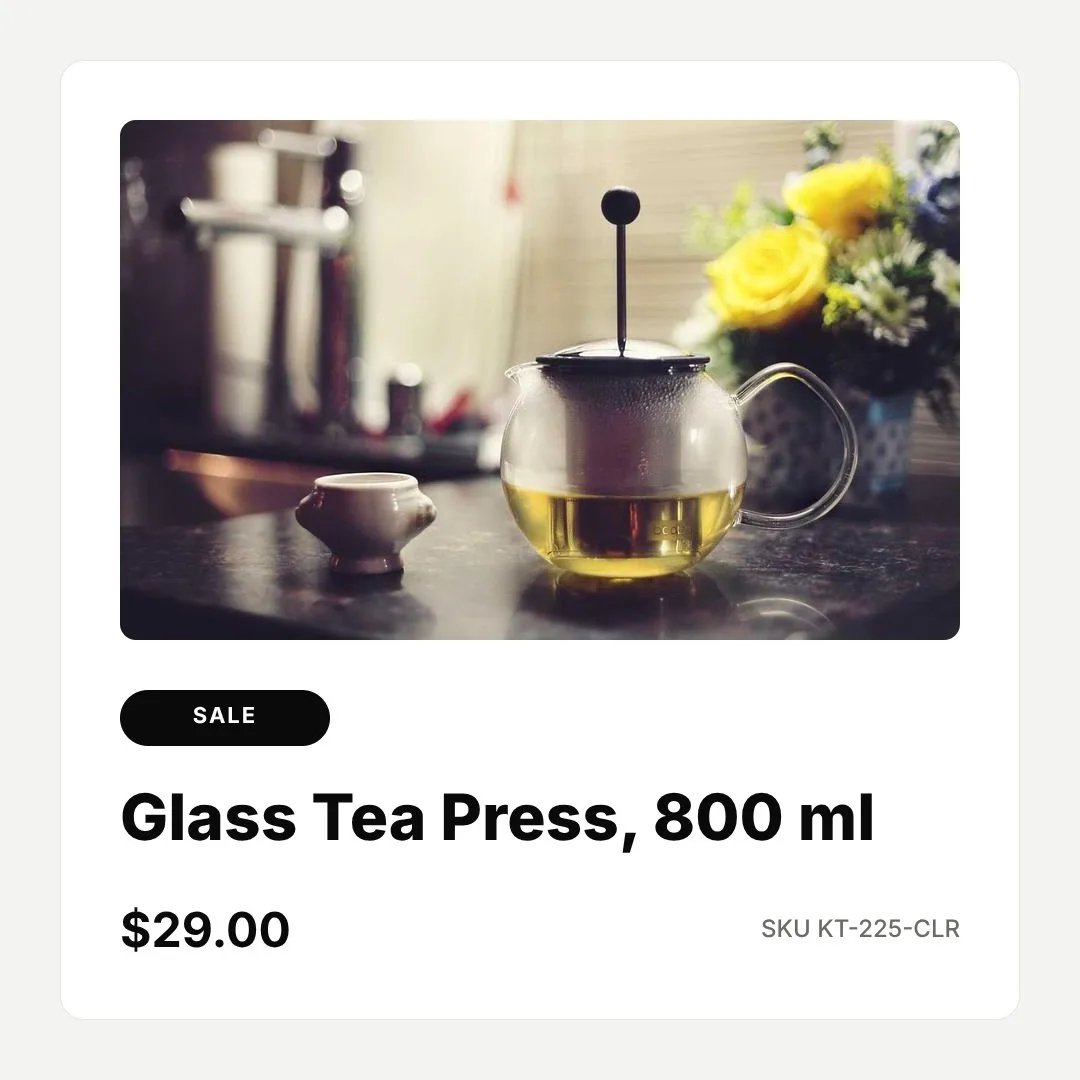
Here's one of those files, the tea press, exactly as the task wrote it:
Step 1: map each CSV row to the design's field keys
Every override is layer.property. "price.text" sets the price layer's text and "photo.image" swaps the photo for the URL in the row. Keeping that in fields_for means the render code never needs to know what a product is, and step 3 hashes exactly what gets sent.
Blank cells need care. We first passed the controller's empty badge straight through and got this, on the left:

An empty value falls back to the text saved in the design, so the card claimed the controller was new. The fix is the if in fields_for: send a space for the text and set badge_bg.opacity to 0. That only works if the pill shape is marked dynamic in the design, so check that before you rely on it.
The opposite mistake is quieter. A misspelled key, say prices.text, still returns 200 and a finished card with the template's sample price on it. The only sign is an x-dma-warnings header, which the task prints: Override key "prices" matched no component in the design and was ignored. The exact keys a design accepts are in its API panel and on the Ruby API page.
Step 2: retry only what a retry can fix
The case statement sorts responses by what a retry would achieve. We checked each status against the live endpoint:
| Response | What it means here | What the task does |
|---|---|---|
Net::HTTPSuccess | The body is the image | Save it, print any warning |
404 "Key not found" | Wrong API key (it's not a 401) | Stop the run |
404 "Design not found" | Wrong design id | Stop the run |
401 "Unauthorized" | No key sent | Stop the run |
Net::HTTPTooManyRequests (429) | The plan's render quota is used up | Stop and print resetAt |
5xx, timeout or reset | Transient | Retry twice, 1s then 2s |
Two rows catch people out. A wrong key is a 404, so a rescue that only looks for 401 keeps hammering the API with every row. And 429 isn't a burst limit to wait out: the body names your quota's resetAt, which can be days away. StopRun is the exception that means "every other row will fail the same way", and the workers check for it before taking the next row. Here's the task with a wrong key:
5 products, 5 to render
  AC-026-GRY failed: 404 Key not found
  FW-021-IVR failed: 404 Key not found
stopped: 404 Key not found
Rake exits non-zero, so a CI job or cron wrapper sees the failure instead of a half-empty cards/ folder.
Step 3: skip rows that haven't changed
Every render counts against your plan, including a repeat of the exact same payload. So the task hashes each row's fields with Digest::SHA1 and keeps the hashes in cards/manifest.json. Run it again with nothing changed:
5 products, 0 to renderThen we changed the tea press from $34.00 to $29.00 in the CSV and ran it once more:
5 products, 1 to render
  KT-225-CLR.jpg  84683 bytes
Hash the fields, not the CSV row. If the export gains a stock column the card doesn't show, nothing re-renders.
Step 4: run four renders at once with threads
Each render is a network wait, and Ruby releases the GVL while a thread waits on I/O, so plain threads give real concurrency here. The task fills a Queue, starts THREADS workers, and gives each one its own Net::HTTP.start block, so every worker reuses one keep-alive TLS connection instead of opening a new one per card. The Mutex guards the shared manifest hash.
In a Rails app, the render call stays the same and moves into a job or a controller. The Rails page has runnable routes, including hosted and signed URLs, and the Ruby page covers every format, multi-size designs and the bulk endpoint, which returns up to 25 image URLs per request.
Common issues and fixes
KeyError: key not found: "IMEJIS_API_KEY".ENV.fetchfailed on purpose because the variable isn't set. Export it or pass it on the command line.cannot load such file -- csvon Ruby 3.4.csvbecame a bundled gem. Addgem "csv"to your Gemfile.- Every card shows sample text. The field keys don't match the design. Read the printed warning.
- A blank cell shows "NEW". Empty values fall back to the design. Hide the layer with
opacity: 0. 404 Key not foundon every row. The key is wrong or deactivated. It's a 404, not a 401.
How much does it cost?
As of November 2026, it's one render per card. The five-row CSV costs 5 renders on the first run and 1 when one price changes. A 300-product shop with about 20 price changes a week uses roughly 380 renders in the first month and 85 a month after that, well inside the free tier's 100 renders. See pricing for larger plans.
Next steps
Drop the Rakefile next to your export, change fields_for to your design's keys, and run it on a five-row file first. The standard library reference for the client is Net::HTTP. For the same job in Node.js with a worker pool and the bulk endpoint, see Node.js: generate images from a template, and for spreadsheet sources in general, batch image generation from CSV.