
Text Pattern Support for Inline Styling
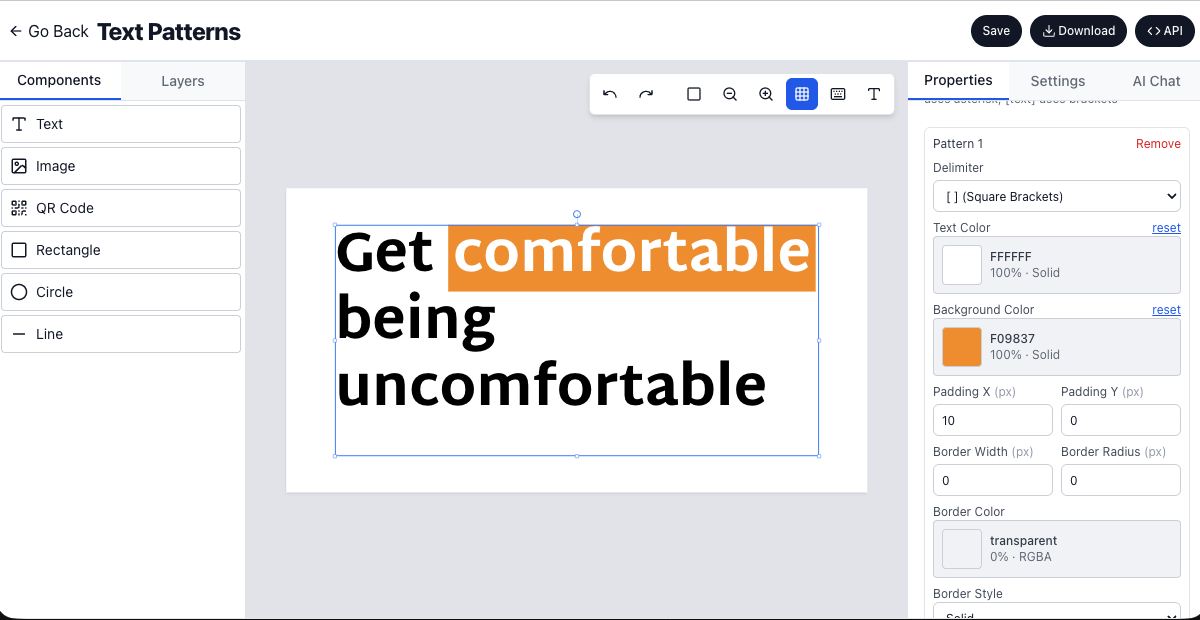

Text pattern support style inline text with delimitersText Pattern Support - Style Inline Text with Delimiters
We're excited to introduce Text Pattern Support to Imejis.io! Now you can style specific portions of text within a single text component using simple delimiters. Wrap text with markers like asterisks, brackets, or custom symbols, and apply custom colors, backgrounds, borders, and padding to create rich, formatted text without needing multiple components.
How it worksHow It Works
-
Add a Text Component: Create or select a text component on your canvas.
-
Define Text Patterns: In the Properties Panel, scroll to the "Text Patterns" section and click "+ Add Pattern".
-
Choose Delimiters: Select from 12 built-in delimiter options:
-
*(Asterisk) - Perfect for emphasis -
[ ](Square Brackets) - Great for labels -
{ }(Curly Braces) - Ideal for placeholders -
|(Pipe) - Clean separators -
~(Tilde) - Alternative emphasis -
_(Underscore) - Subtle markers -
#(Hash) - Distinct markers -
@(At Symbol) - Mentions-style -
$(Dollar) - Value indicators -
%(Percent) - Percentage markers -
^(Caret) - Special emphasis -
&(Ampersand) - Unique markers
-
-
Customize Pattern Styling: For each pattern, configure:
-
Text Color - Custom color for the pattern text
-
Background Color - Background highlight color
-
Padding - Horizontal and vertical padding for badge-like effects
-
Border - Width, color, style, and radius for outlined text
-
Border Radius - Rounded corners for pill-shaped badges
-
-
Use in Your Text: Wrap any portion of your text with the delimiters. For example:
-
*highlighted text*- Styles text with asterisk pattern -
[Important]- Creates a badge-style label -
{placeholder}- Styles placeholder text
-
-
Multiple Patterns: Define multiple patterns to style different portions of text with different styles.
Key featuresKey Features
-
12 Built-in Delimiters - Choose from asterisks, brackets, braces, pipes, and more
-
Rich Styling Options - Text color, background color, padding, borders, and border radius
-
Multiple Patterns - Define unlimited patterns for different styling needs
-
Non-Overlapping Patterns - Intelligent parsing ensures patterns don't conflict
-
Server-Side Compatible - Works the same in client and server rendering
-
Real-Time Preview - See styled text immediately as you type
Use casesUse Cases
Highlighted keywordsHighlighted Keywords
Emphasize important words or phrases in your text by wrapping them with delimiters. Perfect for call-to-action text, product names, or key information.
Example: "Check out our *new product* today!" - The text "new product" appears with custom styling.
Inline badges and labelsInline Badges and Labels
Create badge-style labels directly within your text without separate components. Great for status indicators, categories, or tags.
Example: "Status: [Active]" - Creates a styled badge with background color and padding.
Emphasized textEmphasized Text
Draw attention to specific portions of text with custom colors and backgrounds. Ideal for marketing copy, announcements, or important notices.
Example: {Limited Time} Offer - Save 50%! - The "Limited Time" text stands out with custom styling.
Price highlightingPrice Highlighting
Style prices, discounts, or values with distinct formatting to make them stand out.
Example: "Regular price: $99, Sale price: *$49*" - The sale price is highlighted.
Category tagsCategory Tags
Add category tags or labels within your text content for better organization and visual hierarchy.
Example: "Featured in [Technology] [Innovation] categories" - Multiple styled tags in one text component.
Call to action emphasisCall-to-Action Emphasis
Make CTAs more prominent by wrapping them with patterns that use bold colors and backgrounds.
Example: "Click here to *Get Started Now*" - The CTA text is emphasized.
Social media mentionsSocial Media Mentions
Style mentions, hashtags, or special markers in social media content.
Example: "Follow @username for updates" - The username is styled differently.
Product featuresProduct Features
Highlight product features or benefits within descriptive text.
Example: Our product includes {AI-powered} features and {real-time} updates - Features are emphasized.
Status indicatorsStatus Indicators
Show status or state information with styled text patterns.
Example: "Order Status: [Shipped] | Delivery: [On Time]" - Status information is clearly marked.
Multi language contentMulti-Language Content
Use different patterns for different languages or content types within the same text block.
Example: "English text with [Spanish] translations" - Different languages are visually distinguished.
BenefitsBenefits
-
Single Component Efficiency - Style multiple portions of text without creating separate components
-
Faster Design Workflow - No need to split text into multiple components for styling
-
Consistent Typography - Maintain font family, size, and line height while adding inline styles
-
Flexible Styling - Combine colors, backgrounds, borders, and padding for rich formatting
-
Easy to Use - Simple delimiter-based syntax, no coding required
-
Performance Optimized - Efficient parsing and rendering for smooth performance
-
Template-Friendly - Perfect for dynamic content where text patterns can be applied programmatically
Technical detailsTechnical Details
-
Non-Overlapping: Patterns are parsed to ensure no conflicts or overlaps
-
Validation: All patterns are validated to ensure proper delimiter pairs
-
Server-Side Rendering: Fully compatible with server-side rendering for bulk generation
Example patternsExample Patterns
Here are some common pattern configurations:
Emphasis Pattern (Asterisk):
-
Delimiter:
* -
Text Color:
#FF6B6B(Red) -
Background: None
-
Use:
*Important notice*
Badge Pattern (Square Brackets):
-
Delimiter:
[ ] -
Text Color:
#FFFFFF(White) -
Background Color:
#4ECDC4(Teal) -
Padding X:
8px -
Padding Y:
4px -
Border Radius:
4px -
Use:
[New]or[Featured]
Highlight Pattern (Curly Braces):
-
Delimiter:
{ } -
Text Color:
#2C3E50(Dark Blue) -
Background Color:
#F7DC6F(Yellow) -
Padding X:
4px -
Padding Y:
2px -
Border Radius:
2px -
Use:
{Key feature}
Outlined Badge (Pipe):
-
Delimiter:
| -
Text Color:
#3498DB(Blue) -
Background: None
-
Border Width:
1px -
Border Color:
#3498DB -
Border Style:
solid -
Border Radius:
4px -
Padding X:
6px -
Padding Y:
3px -
Use:
|Tag|
Ready to create rich, formatted text? Sign up for Imejis.io and start using text patterns to enhance your designs!