---
title: "Empower Your Audience with Imejis.io Public Pages"
description: "Discover how Imejis.io Public Pages enable seamless sharing, form filling, and image downloading, removing design complexity for your audience."
url: "https://www.imejis.io/changelogs/imejis-io-public-pages"
image: "https://www.imejis.io/images/changelogs/imejis-io-public-pages.png"
published: "2023-08-01"
author: "imejis"
---
# Empower Your Audience with Imejis.io Public Pages
## Empower Your Audience with Imejis.io Public Pages
In the fast-paced world of digital content, sharing visually appealing designs with your audience is a crucial aspect of engagement. But what if you could take it a step further and make the entire process hassle-free for both creators and consumers? Enter **Imejis.io Public Pages** – a game-changing feature that empowers your audience to interact with your designs, fill out forms, and download images without any design knowledge or fear of accidental changes.
### What are Imejis.io Public Pages?
Imejis.io Public Pages are a revolutionary addition to the Imejis.io platform that allow you to share your designs with others in a user-friendly way. With Public Pages, you can create a space where your audience can access your designs and interact with them without needing any design skills or software.
### How Does It Work?
1. **Share Your Design**: First, create your stunning design on Imejis.io. Once you're satisfied with it, you can easily generate a Public Page link that will showcase your design.
#### Create a Public Page
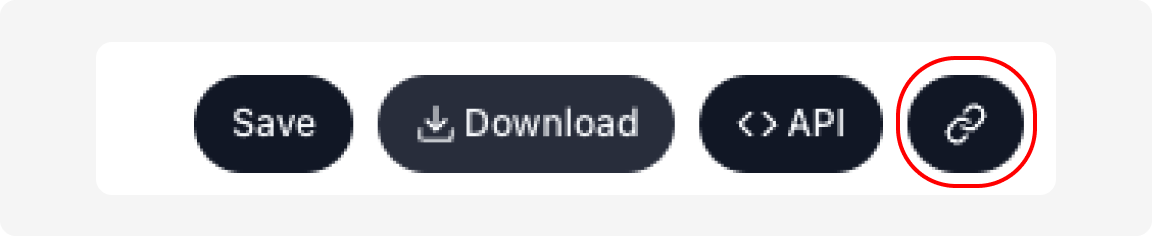
1. Click on the `Link` button on the top right corner of the editor.
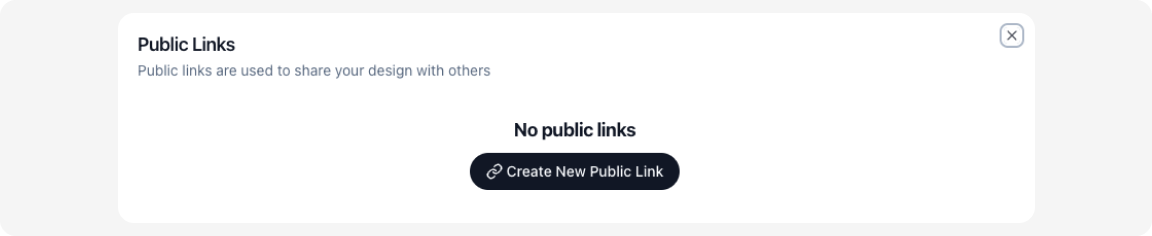
 2. Click on the `Create new Public link` button.
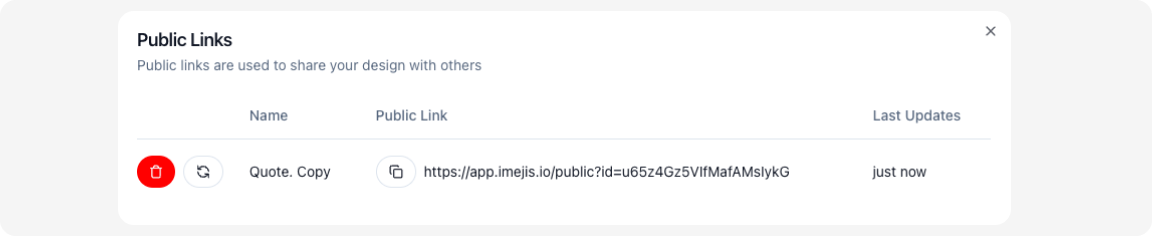
 3. Click on the `Copy public Link` button to copy the link to your clipboard.
 2. **Interact with Ease**: When your audience visits the Public Page, they'll be able to view your design without any complicated tools. They can see your visuals, text, and overall layout effortlessly.
3. **Fill out Forms**: If your design includes forms or fields, your audience can easily fill them out directly on the Public Page. This eliminates the need for back-and-forth emails or downloads.
4. **Download the Image**: Once the form is filled out, your audience can instantly download the image. They'll get a copy of the design exactly as intended, without worrying about accidental changes.
### Benefits for Creators and Consumers
#### For Creators:
- **Simplicity**: Sharing your designs becomes a breeze. No need for explanations or worrying about design alterations.
- **Engagement**: Your audience can interact with your designs, making them feel more involved and engaged.
#### For Consumers:
- **User-Friendly**: Consumers can access and interact with designs without any learning curve.
- **Confidence**: No need to fear accidentally altering the design. They receive a download that's faithful to the original.
- **Convenience**: Filling out forms and downloading the image can be done in one place, saving time and effort.
### Use Cases
Imejis.io Public Pages open up a world of possibilities:
- **Event Invitations**: Create beautiful event invitations, share them via Public Pages, and let guests RSVP directly on the page.
- **Feedback Collection**: Share design concepts, prototypes, or surveys and gather feedback seamlessly.
- **Educational Resources**: Distribute educational materials with interactive elements, allowing students to engage with the content.
### How to Get Started?
1. Create your design on Imejis.io.
2. Generate a Public Page link for your design.
3. Share the link with your audience.
4. Your audience interacts with the design, fills out forms, and downloads the image.
**Unlock the Power of Imejis.io Public Pages**
Imejis.io Public Pages eliminate the complexity of design sharing, form filling, and image downloading. Whether you're a designer, marketer, educator, or anyone who wants to share visuals, Public Pages make it easy, engaging, and efficient.
[Sign Up for Imejis.io](https://www.imejis.io) and explore the world of seamless design interaction today!
2. **Interact with Ease**: When your audience visits the Public Page, they'll be able to view your design without any complicated tools. They can see your visuals, text, and overall layout effortlessly.
3. **Fill out Forms**: If your design includes forms or fields, your audience can easily fill them out directly on the Public Page. This eliminates the need for back-and-forth emails or downloads.
4. **Download the Image**: Once the form is filled out, your audience can instantly download the image. They'll get a copy of the design exactly as intended, without worrying about accidental changes.
### Benefits for Creators and Consumers
#### For Creators:
- **Simplicity**: Sharing your designs becomes a breeze. No need for explanations or worrying about design alterations.
- **Engagement**: Your audience can interact with your designs, making them feel more involved and engaged.
#### For Consumers:
- **User-Friendly**: Consumers can access and interact with designs without any learning curve.
- **Confidence**: No need to fear accidentally altering the design. They receive a download that's faithful to the original.
- **Convenience**: Filling out forms and downloading the image can be done in one place, saving time and effort.
### Use Cases
Imejis.io Public Pages open up a world of possibilities:
- **Event Invitations**: Create beautiful event invitations, share them via Public Pages, and let guests RSVP directly on the page.
- **Feedback Collection**: Share design concepts, prototypes, or surveys and gather feedback seamlessly.
- **Educational Resources**: Distribute educational materials with interactive elements, allowing students to engage with the content.
### How to Get Started?
1. Create your design on Imejis.io.
2. Generate a Public Page link for your design.
3. Share the link with your audience.
4. Your audience interacts with the design, fills out forms, and downloads the image.
**Unlock the Power of Imejis.io Public Pages**
Imejis.io Public Pages eliminate the complexity of design sharing, form filling, and image downloading. Whether you're a designer, marketer, educator, or anyone who wants to share visuals, Public Pages make it easy, engaging, and efficient.
[Sign Up for Imejis.io](https://www.imejis.io) and explore the world of seamless design interaction today!